
⚡ TL;DR — Key Takeaways
- Executing Immediate Session Isolation: Initiating protocols for recovering hacked business Meta accounts demands executing rapid session revocations and blocking linked corporate payment instruments within the first few minutes of breach discovery, completely bypassing the dangerous delay of waiting on a standard support ticket queue.
- Purging Hidden Persistence Mechanisms: Eradicating adversary persistence requires a non-negotiable sweep to purge rogue partner permissions. Attackers systematically add secondary malicious profiles or shadow agency records to the Business Manager architecture, allowing them to retain administrative access even after a password reset is completed by the true owner.
- Validating Financial Dispute Records: Constructing a meticulous forensic log timeline out of invoice numbers, billing statements, and account audit logs is the singular factor that drives a successful banking chargeback, as financial institutions reject verbal claims of fraud lacking structured metadata validation.
- Bypassing Automated Support Blocks: Weaponizing specialized privacy-regulation escalation channels allows organization leads to bypass broken automated help desks and force a human data compliance officer to evaluate the account lockdown under the weight of regional data security statutes.
Table of Contents
An ad manager compromise represents an immediate financial emergency rather than a routine IT troubleshooting ticket. Threat actors who successfully infiltrate a business’s Meta dashboard can instantaneously weaponize linked corporate credit lines, launching thousands of dollars in rogue advertising campaigns within minutes. These malicious allocations often drain available balances long before anyone on the internal operations team notices that the account is behaving abnormally.
Successfully recovering hacked business Meta accounts requires shifting away from passive help-desk waiting queues and launching a disciplined, defensive triage sequence right away. Every hour spent waiting in a generic support line is an hour the attacker’s campaigns continue spending against your linked payment methods, compounding your organization’s ultimate financial liability.
There is a unique, gut-wrenching feeling that hits you when logging into your business dashboard on a standard morning shift, only to discover that a silent session hijacking attack has already maxed out your corporate credit cards. Watching unapproved ad campaigns actively burning through your company’s marketing capital in real time triggers an immediate sense of helplessness. Because these attacks bypass traditional password entry points by stealing active web browser tokens, no alerts go off until the banking limits are shattered, turning a peaceful morning into a high-stakes race to stop a catastrophic financial drain.
This forensic recovery manual details four critical containment steps in strict chronological order: isolating the ad manager and purging rogue partner access, building an immutable forensic log timeline for banking disputes, escalating through specialized privacy-regulation channels when automated support stalls, and hardening infrastructure access controls permanently once recovery is complete.
STEP 1: ISOLATING THE AD MANAGER AND REVOKING ROGUE PARTNER PERMISSIONS
Executing a simple password reset is entirely insufficient to stop an active Meta business account compromise. Threat actors systematically inject secondary malicious user profiles or map fraudulent agency partnerships into your Business Settings layout. They deploy these persistent hooks intentionally so they can retain administrative control over your advertising campaigns even after you change your primary account login credentials.
- Audit and Purge the People Directory: Log into your primary Business Settings interface and navigate straight to the People tab. Carefully evaluate every single authorized user entry against your actual, current employee directory. If you discover any unfamiliar profile, execute an immediate administrative removal, regardless of what access role, manager privilege, or editing permission level that user claims to hold.
- Dismantle Fraudulent Agency Partner Hubs: Next, shift your attention to the Partners tab and inspect it with identical scrutiny. A malicious third-party business entity or shadow agency linked inside this menu can retain un-throttled clearance to execute campaigns across your ad accounts, modify business pages, and manipulate payment methods completely detached from individual employee profiles. This specific directory serves as the primary persistence mechanism used by hackers to keep stealing your ad spend after individual suspicious accounts have been deleted.
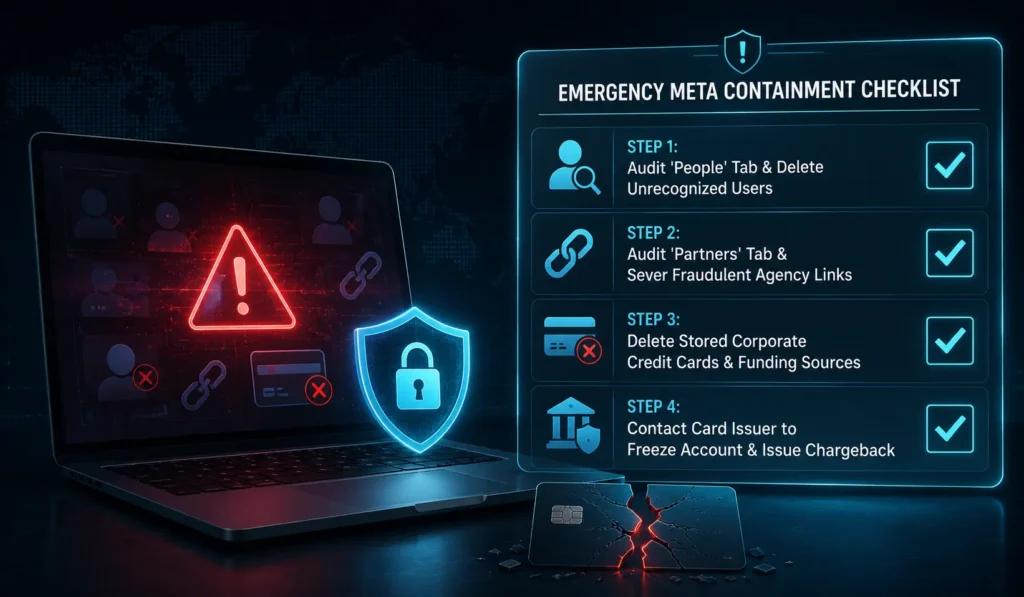
- Evacuate Stored Financial Instruments: Completely remove or block every single active payment method saved within your billing dashboard. Immediately afterward, place a direct call to your commercial credit card provider or merchant banking branch to freeze the impacted lines and request an emergency replacement card. Executing this payment isolation is just as critical as restricting user directories, as an overlooked backdoor partner cannot rack up fraudulent charges against an enterprise funding instrument that has been terminated.
STEP 2: CONSTRUCTING A FORENSIC LOG TIMELINE FOR BANKING DISPUTES
Regaining control of your corporate dashboard is only half the battle; reversing fraudulent ad charges requires a structured, authoritative paper trail. Financial institutions and merchant banks require hard evidence—not a descriptive narrative—before they will authorize a chargeback for unapproved business advertising expenditures.
- Extract the System Activity Log: Navigate to the billing section of your Ads Manager and export your full Account Activity log. This ledger provides a timestamped, chronological history of every single adjustment executed inside your business manager workspace, tracking the operational footprint of the unauthorized actor.
- Isolate Fraudulent Transaction IDs: Cross-examine these timeline entries against your official corporate credit card statement. This comparison allows you to isolate every specific fraudulent invoice number or transaction ID linked to campaigns your marketing department never authorized.
- Build the Case Timeline: Compile this extracted metadata into a single, cohesive CSV or PDF file. Document the precise date and time of each malicious action, the matching transaction ID, the exact dollar amount spent, and a clear note differentiating these line items from your historical account baseline. This file converts a standard customer claim into actionable evidence that a merchant bank’s fraud department can immediately process.
Blindly paying off fraudulent ad debts to Meta in the hope that they will automatically restore your account is a catastrophic trap. Many small business owners panic when their ad manager gets restricted, choosing to settle a multi-thousand-dollar rogue balance just to keep their business page alive. Doing this sends a clear signal to your bank and credit card network that you have accepted liability for those charges. The second you authorize that settlement payment, you make standard fraud chargebacks nearly impossible to win, as you have technically validated the unauthorized campaigns as legitimate business expenses.
Never delete the fraudulent or malicious campaigns from your dashboard before this documentation pipeline is finalized. These rogue ads, however unwanted, function as direct technical evidence supporting your banking dispute and any formal compromise reports filed with platform support. Purging them prematurely destroys the diagnostic footprint of the breach, weakening your financial claim. For platform-side escalation once your evidence is compiled, Meta’s official Business Help Center repository provides the current, authoritative troubleshooting path for submitting unauthorized ad account activity directly to platform security teams. [Facebook Troubleshoot]
STEP 3: LEVERAGING PRIVACY REGULATORY ESCALATION PATHS
Standard automated support workflows frequently freeze when handling a compromised business infrastructure profile. These broken platforms route users through an endless loop of generic chatbot scripts or basic, surface-level troubleshooting documentation that fails to address an active, high-velocity financial fraud situation. When conventional escalation paths leave your team stranded, pivoting to an alternate, regulatory-driven framework can force a manual, human review of your account.
Dedicated data privacy and data access portals—built specifically to process formal compliance inquiries mandated by global legal frameworks like the EU’s General Data Protection Regulation (GDPR) or equivalent state-level data privacy statutes in the United States—are monitored directly by specialized legal and data protection compliance personnel. This system architecture means that requests routed here completely bypass standard, tiered lower-level customer support centers. By framing your official inquiry explicitly around the unauthorized access to sensitive personal data and business identifiers—rather than presenting the issue purely as a standard billing or invoice dispute—you can successfully reroute your ticket into this high-priority regulatory oversight lane.
This escalation strategy functions because formal privacy regulation complaints carry severe legal obligations, strict compliance audits, and mandatory response windows that a digital platform cannot simply ignore or place into an indefinite queue the way it handles a conventional help-desk request. While this method does not guarantee an immediate resolution, it establishes a valid, highly monitored alternate communication pipeline that your operation should actively pursue the moment conventional automated support channels go completely silent.
STEP 4: IMPLEMENTING HARDENED ACCESS CONTROL POST-RECOVERY
Reclaiming your account without fortifying your underlying authentication architecture guarantees a repeat security breach. This concluding remediation phase focus-locks on sealing every infrastructure gap the adversary initially exploited, rather than carelessly returning your dashboard to its vulnerable pre-incident baseline.
- Migrate to Phishing-Resistant Hardware Keys: Transition all high-privilege administrative profiles to physical hardware security keys (such as YubiKeys) rather than relying on standard SMS or application-based multi-factor authentication (MFA). Hardware tokens specifically defeat advanced session hijacking and proxy-based phishing configurations that standard mobile codes cannot block.
- Purge Legacy and Outdated Access Paths: Systematically audit and remove every stale business system user, former employee account, or long-inactive agency partnership. These forgotten connection channels represent the exact type of unmonitored entry points that malicious actors seek out during the target scanning phase.
- Enforce Universal Domain-Wide MFA: Enforce strict multi-factor authentication requirements across every single personal user profile linked to your corporate business manager assets, not just your primary business account. Cybercriminals frequently target a poorly protected personal profile to pivot laterally into the corporate ad manager backend hidden behind it.
- Deploy Isolated Virtual Cards with Hard Spending Caps: Transition your ad account funding away from open-ended corporate credit cards and switch to isolated virtual payment cards equipped with strict daily spending limits. This ensures that even if a future compromise occurs, your ultimate financial liability is capped at a minor, predictable maximum threshold rather than exposing your entire line of credit.
CONCLUSION & EXECUTIVE SUMMARY
Successfully recovering hacked business Meta accounts depends entirely on the speed and precision of your tactical sequencing. You must isolate rogue access points immediately, document every fraudulent transaction ID before running a system cleanup, escalate through alternative regulatory channels when standard help desks fail, and permanently harden your authentication architecture once domain access is restored. Surviving a platform-level breach relies on swift, programmatic session isolation, not on submitting passive customer service tickets that sit unread in a generic help queue.
Every step outlined in this manual operates under the same fundamental principle: an attacker’s window for causing severe financial damage stays open for exactly as long as your incident response remains reactive. A business that treats a Meta account compromise with the same extreme urgency as an active bank fraud alert—initiating immediate isolation, immediate documentation, and immediate compliance escalation—consistently limits its financial losses far more effectively than an operation waiting for a standard support ticket to be answered in the order it was received.
Fighting automated ad fraud requires navigating a broken platform support ecosystem where automated bots frequently stall. What specific recovery delays, support-ticket roadblocks, or merchant dispute pushbacks have you or your team encountered while trying to reclaim a hijacked Business Manager? Did your bank accept your timestamped CSV activity logs right away, or did Meta’s automated support desk run you in circles before a real human compliance officer stepped in? Drop a comment below and share your experience—let’s expose these platform vulnerabilities and help protect our fellow business communities together!
Related: The 2026 Black Kite Ransomware Report Analyzing Mid-Market Risks – Black Kite’s 2026 ransomware report highlights the evolving threat landscape and the urgent need for organizations to strengthen ransomware readiness, resilience, and third-party risk defenses.
Reconstructing the SolarWinds Hack Via 6 Corporate Safeguards – A step-by-step reconstruction of the SolarWinds hack, revealing how a trusted software update became the gateway to a stealthy, far-reaching supply-chain compromise.
Writing Corporate Security Policies via 3 Clean Core Templates – A practical guide to writing lean, enforceable corporate security policies that turn compliance requirements into clear, auditable day-to-day security practices.
Securing Pinecone Vector Databases Via 5 Proven Token Encryption Safeguards – Discover five proven security safeguards to protect Pinecone vector databases from credential exposure, unauthorized access, network threats, and sensitive data leakage.
FREQUENTLY ASKED QUESTIONS (FAQ)
Q1. If the hacker entirely changed the email address and login password on our primary administrative account, can we still execute Step 1’s Partner and People audit?
If you have lost complete entry to your workspace, you must successfully navigate Meta’s formal identity restoration process first—which usually requires submitting official business registry documents, past ad invoices, and corporate identification—before you can access the Business Settings dashboard. The second your entry path is restored, you must run the Step 1 People and Partners audit immediately. Regaining administrative login rights does not automatically evict the shadow users or backdoor partner connections the adversary mapped into your profile while they held access.
Q2. How long does a Meta ad fraud transaction dispute typically take to resolve once we submit our forensic log files to the bank?
Resolution windows differ based on your specific credit card network, bank issuer, and dispute complexity, but commercial card networks generally take anywhere from a few weeks to two full months to process unauthorized corporate ad expenditures. Submitting a highly structured, timestamped CSV or PDF timeline—as detailed in Step 2—safeguards a faster evaluation process compared to filing a vague, generalized fraud narrative lacking specific transaction-level evidence.
Q3. Are we required to notify our active clients or business partners if our Meta advertising platform was compromised, even if their data was not directly modified?
Your notification obligations depend entirely on what informational directories the threat actor successfully intercepted. An ad manager breach focused strictly on abusing your credit line to run spam campaigns requires a different triage response than an intrusion that exposes customer lead sheets, email lists, or tracking pixel metadata. If you discover any possibility that client or partner data records were exposed, consult your legal counsel immediately to evaluate notification mandates, as several regional privacy statutes enforce strict breach notification timelines.
Q4. Is there a specific insurance option that covers fraudulent marketing ad spend losses, similar to standard cyber liability policies?
Certain advanced cyber insurance policies offer riders covering unauthorized corporate transaction losses or platform-level ad fraud, but this specific line of financial recovery is rarely included in basic, out-of-the-box cyber liability agreements. Review your active policy’s fine print specifically for “unauthorized electronic transaction fraud” or “social media asset compromise” clauses. If your current coverage excludes platform ad fraud spend, raise this visibility gap with your commercial broker immediately to update your policy limits.
Q5. Can we permanently block this threat vector by outsourcing our Meta Business account management to an external ad agency instead of handling it in-house?
Outsourcing your marketing campaigns does not eliminate your threat vector; it simply relocates the risk surface. If your external agency suffers a workstation compromise or harbors a rogue employee, attackers can use that agency’s legitimate connection to insert malicious partner nodes exactly as described in Step 1. If you collaborate with a third-party marketing agency, restrict their permissions to the minimum necessary read-and-edit scopes, and continue auditing your Partners directory on a strict schedule regardless of who handles daily campaign tasks.
DISCLAIMER
Educational Notice: This article is published on AI Security Watch strictly for technical educational and general cybersecurity awareness purposes. The configurations and research discussed are based on public threat intelligence data. This content does not constitute professional IT architecture, legal, or financial advice. Because network configurations vary, always verify settings in an isolated test environment or consult with a qualified engineer before modifying live hardware or registries. AI Security Watch contains informational links to external resources; we are not responsible for third-party site accuracy or platform content.