

⚡ TL;DR — Key Takeaways
- Deactivating the Primary Ingress Node: Initiating protocols for stopping email tracking pixels must begin by systematically disabling remote image auto-loading. This foundational configuration change directly eliminates the automatic asset fetch that triggers the pixel’s tracking payload in the first place.
- Masking Network Telemetry: Deploying privacy-focused email proxies allows an organization to intercept and cache remote images on an intermediate server before they can reach a user endpoint. This process successfully masks the recipient’s real IP address and physical location from the tracking network.
- Neutralizing Link-Nested Hashes: Stripping tracking parameters from links embedded inside email bodies fundamentally neutralizes unique click-tracking strings and custom CRM identifier hashes, breaking the telemetry loop before a user ever clicks through to a destination domain.
- Enforcing Atomic Plaintext Layouts: Forcing default plaintext viewing parameters serves as the ultimate nuclear option for absolute communications isolation. This setting entirely strips out the HTML rendering layer and nested CSS layouts that hidden tracking pixels and surveillance scripts depend on to function at all.
Table of Contents
Email tracking has evolved into a pervasive corporate espionage and marketing surveillance mechanism, embedded silently into a substantial share of everyday business correspondence. Comprehensive enterprise software audits prove that an overwhelming 68% of all outgoing corporate emails now contain hidden payload pixels explicitly designed to track recipient IP addresses, device user agents, and exact opening timestamps without consent (Source: Gblock, “How to Detect Email Tracking Pixels in Gmail”).
Stopping email tracking pixels shifts an operator away from passive vulnerability and implements an ironclad communication perimeter instead. Every email opened without protection potentially hands the sender a live behavioral report outlining when you read it, where you likely are, and what device you used—none of which you agreed to share.
The modern reality of sales tracking has turned into a deeply creepy, unvetted digital intrusion. When you open a cold email, the sender instantly knows the exact minute, city, and device you used to read their message. They are essentially running a silent, automated stakeout inside your private inbox, weaponising a routine communication channel into a real-time tracking network. This level of granular surveillance happens completely behind the scenes, turning an everyday business habit into a severe corporate confidentiality risk.
This strategic guide covers five rigid rules to secure your inbox perimeter: disabling remote image auto-loading, deploying privacy-focused proxies, stripping tracking parameters from links, enforcing plaintext viewing, and running periodic gateway-level audits.
RULE 1: MANDATING THE DISABLEMENT OF REMOTE IMAGE AUTO-LOADING
The underlying execution loop of a tracking pixel is deceptively straightforward. A transparent, 1×1 pixel GIF asset is embedded directly into an email’s HTML body. The exact millisecond that message is rendered, the image fetches a unique URL string hosted on an external monitoring server. That singular outbound HTTP request functions as the confirmation trigger that validates the email open, immediately logging your private metadata back to the telemetry network.
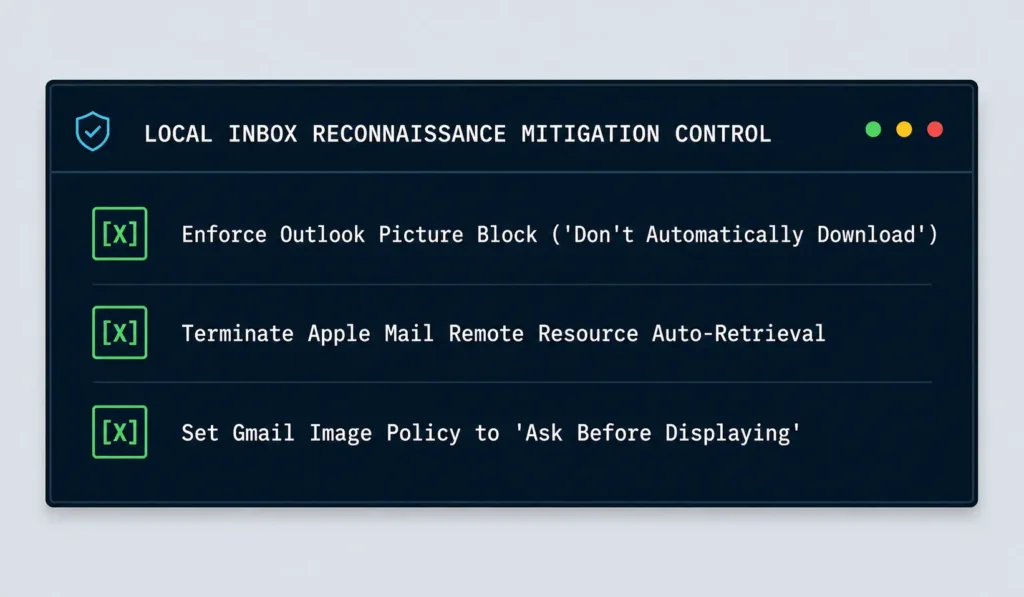
To sever this connection pathway, you must enforce a strict policy across your email clients to disable automated remote asset loading:
Microsoft Outlook: Navigate to File > Options > Trust Center > Trust Center Settings > Automatic Download, and explicitly check the rule labeled “Don’t automatically download pictures in HTML email messages or RSS items”.
Apple Mail: Open Mail > Settings > Viewing, and systematically uncheck the configuration line for “Load remote content in messages”.
Google Gmail: Open your primary web dashboard, click Settings > See all settings > General > Images, and toggle the choice to “Ask before displaying external images”.
You must understand that clicking the “Display Images” banner on a suspicious or unsolicited cold email completely overrides your client’s default security architecture. The moment you manually grant permission to load those external assets, the hidden tracking pixel fires instantly. This action signals back to commercial spam networks that your email address is active, actively monitored, and highly vulnerable. Furthermore, it leaks your real-world network location and device user agent to automated marketing list aggregators.
By maintaining this rigid deactivation threshold across your enterprise endpoints, embedded telemetry scripts simply stall. The outbound image request required to execute the handshake never departs your machine, neutralizing the vast majority of standard tracking campaigns without requiring complex network infrastructure adjustments.
RULE 2: DEPLOYING PRIVACY-FOCUSED EMAIL PROXIES AND RELAYS
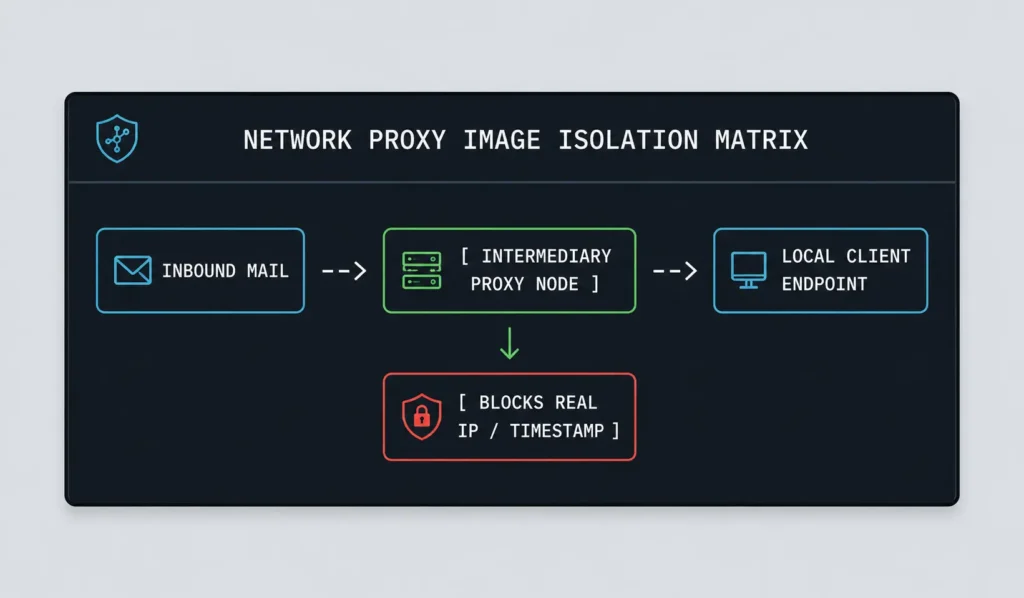
Disabling remote images entirely introduces an unavoidable usability tradeoff, since legitimate graphics in newsletter subscriptions and standard corporate correspondence also fail to render. Deploying a privacy-focused proxy architecture resolves this bottleneck. Instead of blocking incoming data payloads outright, this system forces images to load through a secure, isolated intermediary infrastructure.
- The Apple MPP Architecture: Turning on Apple’s Mail Privacy Protection (MPP) routes all embedded media, tracking pixels included, through an isolated network of proxy servers before they can reach your endpoint. The asset is fully cached on an intermediary system. Consequently, surveillance trackers only capture a generic proxy IP address and an automated pre-fetch timestamp. This completely corrupts your true opening time, geographical location, and device metadata while preserving image rendering.
- Centralized Image Relay Engines: Self-hosted and enterprise-tier proxy relay services enforce the identical protective layer for alternative corporate clients. When an inbound message hits the infrastructure, external asset requests are forced to route to a controlled proxy node. The server queries the tracking domain, sanitizes the image block, and mirrors it to your local inbox. This mechanism keeps email interfaces visually functional without maintaining an uninsulated connection between local hardware and malicious tracking perimeters.
RULE 3: STRIPPING TRACKING PARAMETERS FROM OUTBOUND AND INBOUND REFS
Hidden payload pixels are not the only surveillance tracking tools deployed inside your daily email streams. Links embedded directly within the message body frequently contain complex, nested URL query parameters, custom CRM identifier hashes, click-tracking strings, and UTM trackers. These alphanumeric payloads are engineered to report back to external databases precisely which specific employee clicked a hyperlink, alongside exact destination timestamps.
- Audit Hyperlink URL Strings: You can identify these embedded telemetry strings by inspecting the full destination address before authorizing a mouse click. They systematically populate directly after a question mark (
?) symbol within the URL structure (frequently displaying strings such as?utm_source=,?trk=, or unique alphanumeric subscriber hashes).
- Deploy Automated Parameter Sanitization: Integrating localized browser extensions or automated privacy gateways allows your system to clip these variables out of the address bar before the outbound network request is dispatched, preserving your ability to reach a target domain while permanently stripping away the tracking strings.
Review the Electronic Frontier Foundation’s digital surveillance index for current, technical guidance on identifying and neutralizing these tracking mechanisms, since new parameter formats and tracking techniques emerge as older ones become widely recognized and blocked. You should treat any unfamiliar, lengthy, or heavily encoded query argument appended to an inbound link with the identical architectural scrutiny you would apply to an unverified tracking pixel.
RULE 4: ENFORCING DEFAULT PLAINTEXT VIEWING PARAMETERS
For absolute privacy, forcing your mail client to render every inbound message strictly in plaintext completely eliminates the attack surface that hidden payload tracking pixels depend on. This represents the most aggressive architectural containment strategy available, and it introduces a noticeable tradeoff in visual styling and document formatting.
- Dismantling the HTML Layer: Plaintext rendering strips out the HTML compilation layer entirely. This means there is no image tag for a tracking pixel to exploit, no hidden CSS trick to conceal a payload asset, and no rich formatting or scripts to execute malicious payloads. An email rendered purely as text simply has nothing left for a tracking mechanism to attach itself to.
- Enforcing Global Plaintext Configurations: Most major email clients support a plaintext-only viewing mode in their advanced configuration settings. However, enabling this universally means every email—including legitimate corporate newsletters and heavily styled business correspondence—loses its visual design. This rigid rule is best reserved for privacy-critical accounts or for operators who have decided that tracking risks outweigh the cosmetic benefits of formatted emails.
RULE 5: RUNNING REGULAR GATEWAY-LEVEL AUDITS AND HEADER SCANNING
Individual client-level settings insulate a single mailbox, but enterprise organizations require structural visibility and control at the network layer to protect every employee consistently. This phase marks where corporate security teams transition from personal privacy configurations to systematic gateway-level enforcement.
- Audit Inbound Email Headers: Routinely inspect raw email headers for known tracking domains. Cross-examine incoming routing data against a centralized, maintained list of known telemetry service providers, pixels, and marketing automation platforms.
- Enforce Centralized Gateway Filtering: Configure inbound mail gateway filtering rules to automatically strip, rewrite, or block remote web content originating from flagged telemetry infrastructures before messages ever reach an end-user inbox. This applies the protective logic of Rule 1 centrally, removing any reliance on individual employee software compliance.
Execute these header and domain checks on a recurring schedule, as tracking service providers frequently rotate domain names, IP subnets, and host infrastructures specifically to evade static enterprise blocklists. A security gateway configuration reviewed once at deployment and never updated will lose its defensive edge as tracking mechanisms adapt.
CONCLUSION & COMMUNICATIONS ACCESSIBILITY SUMMARY
Stopping email tracking pixels effectively requires layering all five practical rules together into a unified security posture: disabling remote image auto-loading by default, routing necessary media assets through privacy-focused proxies, stripping telemetry parameters from body links, enforcing plaintext viewing where confidentiality is paramount, and maintaining regular gateway-level audits across your organization’s network layer. No single rule closes every tracking vector on its own, as commercial senders and telemetry providers continuously adapt their techniques as older methodologies become widely blocked.
Real communication isolation requires constructing a stateful, repeatable execution pipeline rather than operating under a passive trust assumption that your email client’s out-of-the-box settings are protecting you adequately. Treating inbox privacy as an active, ongoing operational discipline—rather than a static configuration toggled once and forgotten—is the only way to successfully insulate your corporate metadata as tracking techniques continue to evolve.
Hardening an enterprise communication perimeter requires transitioning from basic endpoint settings to programmatic, automated content sanitization. While securing your communication boundaries limits reconnaissance, blocking wider automated infrastructure threats requires analyzing the full scope of AI cyberattacks 2026 trends hitting corporate environments daily. What specific email tracking blockers, privacy-centric mail clients (such as ProtonMail or Thunderbird), or corporate gateway security tools (like Mimecast or custom postfix filters) does your organization deploy to maintain complete communications isolation? Do you audit raw mail headers manually during incident triage, or do you rely on automated security gateways to drop tracker payloads at your boundary lines? Drop a comment below and share your experience—let’s swap our defensive architecture tips and secure our inboxes together!
Related: Conducting a HIPAA Assessment Via 4 Rigid Control Measures – A rigorous HIPAA assessment turns healthcare data protection into a continuous process of mapping PHI, enforcing access controls, validating encryption, and managing third-party risk.
Understanding ISO 27001 Foundations Using 6 Practical Rules – ISO 27001 turns information security into a practical, repeatable governance system—helping organizations protect critical assets, manage risk, and build lasting trust through six foundational rules.
Recovering Hacked Business Meta Accounts Using 4 Escalation Steps – A practical four-step playbook for recovering hacked Meta business accounts, stopping fraudulent ad spend, removing hidden attacker access, and hardening the account after recovery.
The 2026 Black Kite Ransomware Report Analyzing Mid-Market Risks – Black Kite’s 2026 ransomware report highlights the evolving threat landscape and the urgent need for organizations to strengthen ransomware readiness, resilience, and third-party risk defenses.
FREQUENTLY ASKED QUESTIONS (FAQ)
Q1. If I disable remote images entirely, will I still be able to tell if my own outgoing emails are being tracked by recipients?
No, these settings strictly manage how your email client processes incoming assets; they do not impact outbound messages. If you want to audit your outgoing mail to check if your CRM or email marketing service is automatically injecting tracking scripts, you must open your sent folder and manually inspect the raw HTML source code of the dispatched message.
Q2. Does using a VPN accomplish the same thing as the privacy proxy described in Rule 2?
No, they operate on different layers. A VPN encrypts your entire network connection to mask your IP address globally, whereas an email privacy proxy is purpose-built to intercept, download, and cache tracking pixels on an isolated server before they can reach your endpoint. While running both together provides excellent redundancy, a VPN on its own cannot stop an embedded tracking pixel from firing, logging your device user agent, or recording your exact opening timestamp.
Q3. Will blocking tracking pixels cause legitimate transactional emails, like order confirmations or two-factor authentication codes, to stop working properly?
No, blocking these trackers only suppresses the invisible 1×1 image payload. Core functional text—such as security codes, confirmation numbers, and invoice details—remains completely intact because it does not rely on external HTML rendering elements to load. You might occasionally see a missing corporate logo or blank promotional banner, but the operational utility of the message is never compromised.
Q4. Is it illegal for commercial companies to embed tracking pixels in marketing emails without explicitly notifying recipients?
Legality depends entirely on regional jurisdictions. Under the European Union’s GDPR, tracking pixels generally require explicit user opt-in because they collect and process personal data like location metrics. Conversely, U.S. federal laws lack a blanket restriction, though state-level frameworks like California’s CCPA mandate clear data-sharing disclosures. Because many platforms exploit these legal gray areas where local rules are weak, enforcing personal-level blocking remains your most reliable line of defense.
Q5. Do tracking pixels pose any real security risk beyond basic privacy exposure, such as malware delivery?
Tracking pixels themselves are simple image asset requests and do not contain or execute malware payloads directly. However, allowing a pixel to fire alerts malicious networks that your email address is active, monitored, and highly responsive. This validation immediately upgrades your profile to a high-value target for sophisticated phishing campaigns and credential harvesting operations, making pixel deactivation a vital element of broader corporate security hygiene.
DISCLAIMER
Educational Notice: This article is published on AI Security Watch strictly for technical educational and general cybersecurity awareness purposes. The configurations and research discussed are based on public threat intelligence data. This content does not constitute professional IT architecture, legal, or financial advice. Because network configurations vary, always verify settings in an isolated test environment or consult with a qualified engineer before modifying live hardware or registries. AI Security Watch contains informational links to external resources; we are not responsible for third-party site accuracy or platform content.