

Picture this. Your 14-day Malwarebytes free trial has just expired. The four green shields on the dashboard have gone dark. A banner is asking you to pay $44.99 a year. You stare at it. You wonder if staying on the free version is actually good enough. After all, you have been using computers for years without a major incident. How much worse could it really be?
Here is the honest answer — quite a lot worse. But not in the way most articles explain.
Malwarebytes free vs premium is not a simple “more features” comparison. These are practically two different products. Free is a manual cleanup tool. Premium is a full-time AI-powered security guard. And the thing that separates them — the thing most comparison articles skip entirely — is what the Malwarebytes AI engine is actually doing behind the scenes.
That is what this article is about. We will cover the Katana AI engine in plain language, all six pricing plans — personal and business — the real independent test scores, and a clear framework for who should actually upgrade in 2026. If you want to understand the broader AI security landscape that makes tools like Malwarebytes necessary, read our complete analysis of how AI threat detection is redefining cybersecurity in 2026.
What Malwarebytes Free Actually Gives You
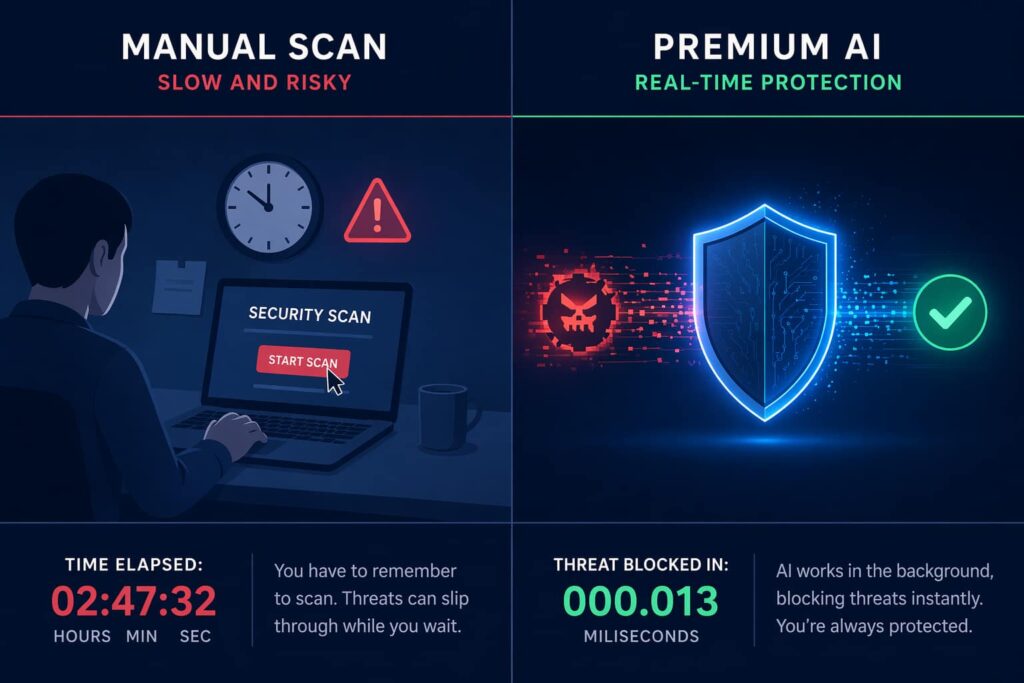
Malwarebytes free functions purely as an on-demand scanner. According to Wikipedia’s entry on Malwarebytes, the free edition detects and removes malware only when you manually start a scan. There are no real-time shields, no background monitoring, no scheduled scans.
You do get the Browser Guard extension free for Chrome and Firefox — it blocks ads, trackers, and known scam sites, and that is genuinely useful. But it is the only proactive layer available in the free tier.
The fundamental problem is timing. With on-demand scanning, malware has already executed on your system before you discover it. It may have captured passwords, logged keystrokes, or started encrypting files. You just do not know yet, because you have not run a scan. Think of Malwarebytes free as a cleanup crew that arrives after the break-in. Malwarebytes premium is the lock on the door — and the AI engine is what makes that lock intelligent.
What the Malwarebytes AI Engine Actually Does: Katana and Malware.AI Explained
Most comparison articles spend two paragraphs on features and stop there. Here is what is actually happening inside Malwarebytes premium.
Traditional antivirus works by keeping a list of known threat signatures and checking files against that list. If something matches, it is blocked. If it does not match, it gets through. The weakness is obvious: it offers zero protection against threats that have never been catalogued before — so-called zero-day attacks.
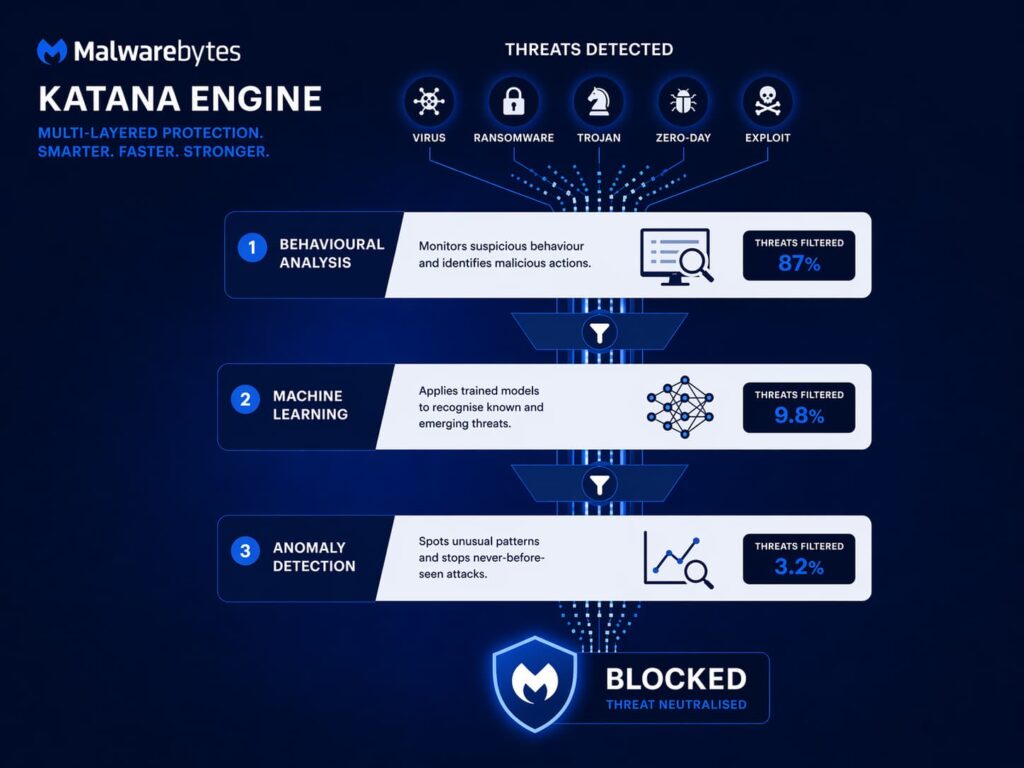
Malwarebytes premium runs two interconnected AI systems. The first is Malware.AI, which uses machine learning to detect new types of malware by scanning for unusual behaviour — flagging trojans, rootkits, and ransomware without waiting for official database updates. As Cybernews notes in their Malwarebytes review, Malware.AI can identify threats that have never appeared in any known database, protecting against zero-day malware that traditional scanners would simply miss.
The second system is the Katana engine. According to Cloudwards’ independent review, Katana combines rules-based techniques with behavioural analysis to stop threats at every stage of an attack. It uses AI-backed intrusion detection and prevention, running behavioural analysis, anomaly detection, and machine learning simultaneously in real time.
Wikipedia confirms that in early 2025, the Katana engine received a significant update to include more advanced AI-driven and machine-learning approaches, giving it the ability to recognise malware families that had not yet been catalogued. This is the critical capability: it does not need to have seen your specific threat before. It only needs to recognise that something is behaving like a threat — and that is what separates Malwarebytes premium from the free version at a fundamental level.
Malwarebytes Premium’s Four Real-Time Protection Shields

When you move from Malwarebytes free to Malwarebytes premium, four independent protection shields activate. Each one covers a different attack vector and operates in real time — none of them require you to initiate a scan.
- Web Protection — blocks malicious URLs across all browsers before the page loads. Phishing sites, drive-by downloads, and malicious ad networks are stopped before your system makes any contact with them.
- Malware and PUP Protection — monitors files as they arrive on your system. Before any download can execute, the Katana AI engine analyses it. Potentially unwanted programs — browser hijackers, adware bundles, and spyware — are caught before they install.
- Ransomware Protection — this is the most critical layer in 2026. According to Desking Blog’s review, this layer monitors running applications for the telltale signs of a ransomware attack — an application suddenly attempting to encrypt a large number of your documents. It stops the attack immediately and rolls back changes already made to your files. Malwarebytes free offers no equivalent of this.
- Exploit Protection — wraps your browsers and key applications in an additional layer of defence against exploits that use software vulnerabilities to deliver malware, even when you have not downloaded anything suspicious.
Malwarebytes free has none of these four shields. The only protection in the free version is whatever you find when you manually run a scan — and by then, any of the above could have already done its damage.
What Ransomware Actually Does Without Real-Time Protection
Here is the scenario most upgrade articles skip, because it is uncomfortable. According to MalwareFox’s detailed comparison: you open a malicious email attachment on a Tuesday afternoon. Within minutes, thousands of files begin encrypting. Your family photos, work documents, and tax records are locked behind a ransom demand. Malwarebytes free might catch the malware on your next manual scan — but by then, every unprotected file is already gone.
Ransomware does not wait. It runs silently, encrypts everything it can reach, and presents you with a payment demand once the damage is complete. The only effective defence is interception before execution — which is precisely what the Ransomware Protection shield in Malwarebytes premium does, using the AI engine to spot encryption behaviour patterns the moment they begin.
According to MalwareFox, Malwarebytes premium uses behavioural analysis to catch ransomware before it finishes encrypting. Behind the scenes, it layers AI analysis, machine learning, signature detection, runtime sandboxing, and exploit mitigation into a multi-layered
Independent Test Scores: What the Data Says
97.8% Real-world threat blocking score — Malwarebytes Premium (AV-Comparatives, July–August 2025) Source: MalwareFox comparison
100% In-the-wild malware blocking score — AVLab Cybersecurity Foundation 2025. Malwarebytes also named Product of the Year for 2024 and 2025. Source: Wikipedia — Malwarebytes
40% Of devices already running another antivirus still had threats caught by Malwarebytes Premium — meaning your existing protection alone is not enough. Source: Filehorse
These are solid numbers, though not class-leading compared to Norton or Bitdefender at the top of independent rankings. What Malwarebytes premium does particularly well is catching behaviourally complex newer threats — the kind that signature databases have not caught up to yet. That is where the Katana AI engine earns its place.
All Six Malwarebytes Pricing Plans — Personal and Business (2026)
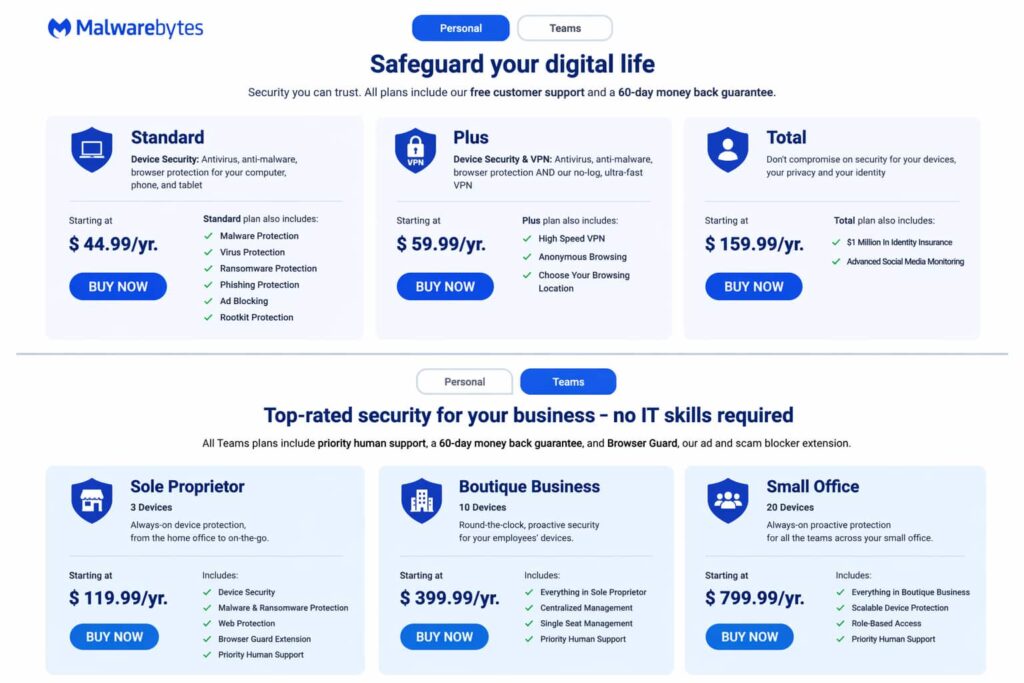
One area where the Malwarebytes free vs premium conversation is often oversimplified is pricing. There are not two options — there are six. Here is what each one includes, directly from the Malwarebytes website.
| Plan | Price | Devices | Key Inclusions |
| Standard | $44.99 / yr | 1 device | Malware, virus, ransomware, phishing, ad blocking, rootkit protection |
| Plus | $59.99 / yr | 1 device | Everything in Standard + High Speed VPN, anonymous browsing, choose browsing location |
| Total | $159.99 / yr | 1 device | Everything in Plus + $1 Million Identity Insurance + Advanced Social Media Monitoring |
| Plan | Price | Devices | Best For |
| Sole Proprietor | $119.99 / yr | 3 devices | Freelancers and solo home-office workers needing always-on protection across multiple devices |
| Boutique Business | $399.99 / yr | 10 devices | Small teams and micro-businesses needing round-the-clock proactive security for employee devices |
| Small Office | $799.99 / yr | 20 devices | Larger small businesses needing full always-on proactive protection for entire teams |
A few things worth noting from the pricing structure. The Standard plan at $44.99 is the meaningful upgrade for most individual users — that is where the four real-time AI protection shields switch on. The Plus plan makes sense if you regularly use public Wi-Fi and want to avoid subscribing to a separate VPN service. The Total plan is for users who have experienced a data breach or want comprehensive identity protection layered on top of device security.
On the business side, the Sole Proprietor plan at $119.99 per year for three devices is particularly well-suited to freelancers and remote workers who access client data from personal devices. If your computer holds client files, project work, or business credentials, the standard personal free tier is simply not an appropriate risk level — this plan exists specifically for that scenario.
The Free Workaround Most Articles Never Mention
There is a legitimate free setup that gets you closer to real-time protection without paying — and most comparison articles skip it entirely.
According to MalwareFox: pair Malwarebytes free with Windows Defender. The key step is to disable “Register Malwarebytes in the Windows Security Center” inside Malwarebytes settings. This prevents Malwarebytes from deactivating Defender, so both tools run together — Defender handles real-time background protection while Malwarebytes handles on-demand cleanup for anything Defender may have missed.
This works because Malwarebytes was originally designed as a second-opinion scanner to complement existing antivirus software. The two tools coexist cleanly without conflicts.
Is this as effective as Malwarebytes premium? No. You still lose the Katana AI engine running in real time, the ransomware rollback layer, the exploit shield, and the web protection that blocks URLs before they load. But it is a meaningful improvement over running Malwarebytes free alone, at zero extra cost. If you browse carefully and maintain good security habits, this combination is a realistic option. If you bank online, store sensitive files, or work with client data, it is not a sufficient substitute.
Who Should Upgrade — An Honest Decision Framework
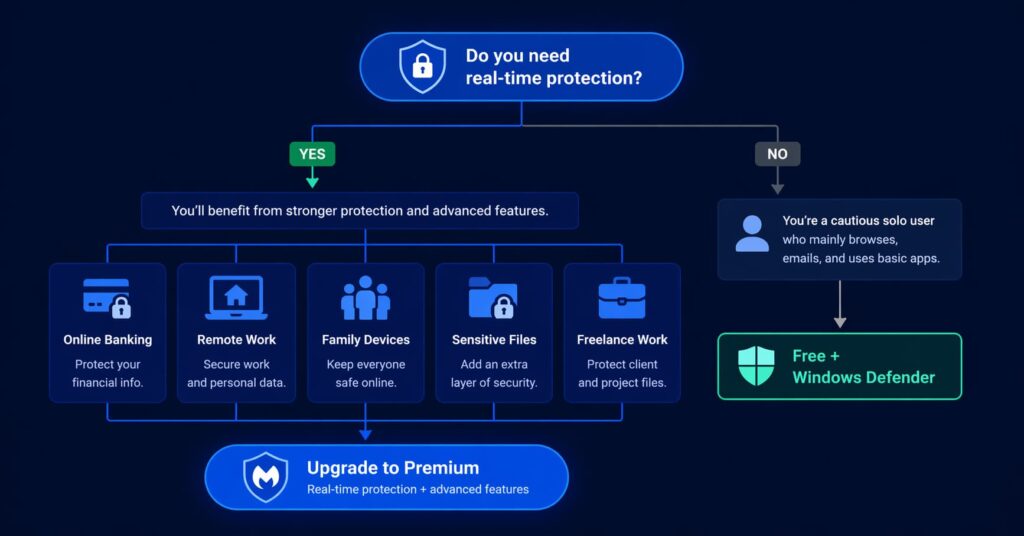
The upgrade is worth it for some users and genuinely optional for others. Here is how to think about it honestly.
You should upgrade to Malwarebytes premium if:
- You conduct online banking or manage financial accounts from your PC. The window between infection and financial damage can be minutes. Real-time AI protection is not optional for this use case.
- You store sensitive documents on your device — tax returns, medical records, legal documents, or anything you cannot afford to lose or have exposed. Ransomware treats all of these equally.
- You work from home and access corporate or client resources. A compromised personal device is a potential entry point into your employer’s or client’s systems. The Sole Proprietor business plan at $119.99 per year for three devices was built for exactly this scenario.
- You have children using the same computer. Children click unfamiliar links, download free games from dubious sites, and engage with exactly the kind of content that delivers malware. The web protection and real-time shields are worth it for any household with young users.
- You use your computer for freelance or client work. If your machine is compromised for three days during a ransomware incident, that is three days of lost income plus potential client data exposure. The Malwarebytes free version cannot protect against this in real time.
The free setup may be sufficient if:
You are a technically careful user who manages your own downloads, uses a hardware firewall, backs up data regularly to an offline location, and actively monitors what runs on your system. In this case, the Defender plus Malwarebytes free combination is a legitimate approach.
The Verdict
Malwarebytes free is a useful tool. It is not a security strategy.
The Katana AI engine and Malware.AI represent a genuine technological step forward — using behavioural analysis and machine learning to catch threats that have never been catalogued, including zero-day attacks that would sail through traditional signature-based defences. The 2025 update to the Katana engine specifically improved its ability to recognise previously unknown malware families, as confirmed by Wikipedia’s Malwarebytes entry. None of this operates in real time in the free version.
The independent numbers make the case: 97.8% real-world threat blocking from AV-Comparatives, a 100% in-the-wild malware score from AVLab, and — perhaps most telling — threats found on 40% of devices already running another antivirus. When Malwarebytes premium catches threats that Windows Defender misses on four out of ten protected devices, that is not a marginal improvement. That is a different category of protection.
For users who bank online, store sensitive documents, work from home with client data, or run a household with children — the Standard plan at $44.99 per year is the right decision. The AI engine is not a marketing feature. It is the lock on the
Related: NordVPN vs Surfshark 2026: Which AI Security Features Actually Protect You? – Understand how different VPN services work and which one you should choose.
Agentic AI Cyberattacks: Genuine Threat or Overhyped Warning? Inside the Five Eyes Alert – Five nations just warned that AI-driven cyberattacks are months away — and even top security experts can’t agree on whether to panic or shrug.
Sources
- Malwarebytes Official Site
- MalwareFox — Malwarebytes Free vs Premium Comparison
- Wikipedia — Malwarebytes (software)
- Cybernews — Malwarebytes Review 2026
- Cloudwards — Malwarebytes Antivirus Review
- Desking Blog — Malwarebytes Review 2026
- Filehorse — Malwarebytes Download Page
- AV-Comparatives
- AVLab Cybersecurity Foundation
Disclaimer: This article is for educational purposes only and does not constitute professional cybersecurity advice. This article contains no affiliate links. For articles that do contain affiliate links, see our full Affiliate Disclosure policy.
For full details on our editorial standards and affiliate policy, please read our Disclaimer.