
⚡ TL;DR — Key Takeaways
- Administrative access controls: Establishing HTTP Basic Authentication directly in front of your endpoint forms your primary shield—never expose the raw API to public interfaces without a secure ollama nginx proxy setup to guard it.
- Vendor/client parameter validation: Routing every single inbound network request exclusively through your dedicated secure ollama nginx proxy gateway layer cleanly intercepts and drops malformed, automated, or malicious packets before they can ever hit your core port 11434 backend model runtime.
- Stream-optimized runtime flags: Disabling Nginx response buffering and stretching backend connection timeouts inside your secure ollama nginx proxy configuration prevents severe Large Language Model token generation lags or unexpected mid-sentence response truncation.
- Perimeter isolation validation: Validating your newly hardened infrastructure demands active terminal verification—explicitly test your secure ollama nginx proxy with both raw unauthenticated connection attempts and properly credentialed requests to guarantee the deployment holds firm against unauthorized port scanners.
Table of Contents
By default, Ollama binds directly to localhost:11434, which functions safely on an isolated machine but quickly transforms into a dangerous infrastructure liability if bound to a public interface. Because an unshielded deployment lacks any native user access controls, any remote entity that scans and discovers the open port can freely query your models. This lack of perimeter defense permits unauthorized actors to effortlessly hijack your expensive GPU compute cycles, drain system VRAM, or extract active prompt history logs.
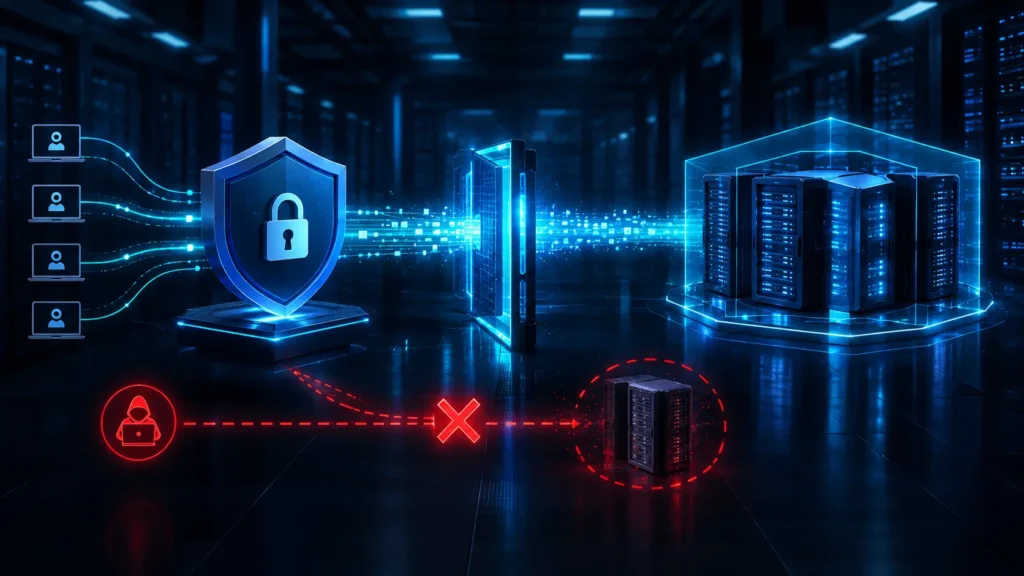
Forcing all incoming traffic through a secure ollama nginx proxy configuration is a mandatory engineering requirement rather than a casual hardening preference. This dedicated gateway provides the exact authentication barrier needed to block remote threat actors from consuming your hardware clusters, exhausting system memory, or downloading proprietary weights.
There is a distinct moment of stomach-drop realization when you run your first network log audit on an exposed model server. You expect typical script-kiddie web traffic hitting port 80 or 443, but instead, you see a flood of automated, highly specific API probes targeting /api/generate and /api/tags on port 11434. It is a massive wake-up call to realize that botnets aren’t just scanning for unpatched SSH keys anymore; they are actively hunting for raw LLM backends to offload their compute costs, essentially hijacking thousands of dollars of your enterprise GPU hardware to run their own processing pipelines for free.
The five production-grade steps outlined below will guide you through building this protective perimeter from scratch. We will conclude with live terminal verification tests to guarantee your secure ollama nginx proxy configuration is actively isolating your local runtime from public exploitation.
STEP 1: PROVISIONING CORE GATEWAY DEPENDENCIES AND AUTHENTICATION TOOLS
Before writing any configuration lines or routing metrics for your reverse proxy layer, you must establish a hardened base of underlying software dependencies. This initial preparation phase ensures your environment has all the binaries needed to process traffic and securely manage encrypted user records.
- Update system repository indexes: Refresh your package manager’s remote index metadata completely so that your server pulls down current, fully patched software releases rather than installing outdated or vulnerable cached packages.
- Install the core Nginx web server engine: Deploying this resilient, high-performance web server establishes the architectural perimeter that sits directly in front of your AI models to intercept, filter, and authenticate incoming traffic before it can interact with the core runtime.
- Extract the apache2-utils toolkit: This lightweight package installs the highly reliable
htpasswdutility required to generate local encrypted password hashes—despite the legacy “Apache” naming convention, it remains a distribution-agnostic binary utilized universally for HTTP auth across almost all web server backends.
STEP 2: GENERATING THE HTTP BASIC AUTH CREDENTIAL STORE TO SECURE OLLAMA NGINX PROXY DISK ACCESS
Authentication functions as the cornerstone control mechanism within a resilient infrastructure deployment—without a forced authentication gate, any subsequent perimeter hardening efforts remain purely cosmetic. Restricting raw system access at the storage layer ensures that only authorized network clients can execute resource-heavy model requests.
- Initialize an encrypted htpasswd registry: Use the specialized
htpasswdbinary utility to generate an isolated, secure password file containing your unique administrative username paired with an aggressively salted cryptographically hashed password file, completely eliminating the dangerous practice of storing plaintext string credentials inside active configuration scripts.
- Store the credential file outside public web directories: The newly initialized credential payload must reside strictly within a protected administrative system file path that the proxy daemon can access locally, but which is completely disconnected from any public web-facing directories—misplacing this file inside an active HTTP document root would immediately expose your sensitive credential hashes to automated external download sweeps.
- Restrict file permissions to the minimum required: Enforce granular access controls so that only the low-privilege system daemon account running the active proxy process holds read access to the credential registry, ensuring that other local processes or unprivileged accounts cannot scrape the file contents from disk storage.
- Ground your configuration in official guidance: Security teams orchestrating this critical perimeter gate should systematically cross-reference Ollama’s official community repository documentation guidelines to guarantee that their reverse proxy implementation mirrors the most up-to-date upstream container variables and network security recommendations, as architectural defaults frequently shift between release tags.
Leaving your authentication credential store files exposed with loose, overly permissive read flags (such as the default 644 file permissions) introduces a severe local threat vector. Any unprivileged system account, compromise payload, or malicious background script running on that host can instantly copy your password registry file; from there, threat actors can effortlessly transfer the hashes to external machines and execute rapid, offline brute-force or dictionary cracking attacks using high-velocity GPU clusters to recover your plaintext access keys completely undetected by standard network monitoring tools.
STEP 3: CONFIGURING THE VIRTUAL HOST ROUTING TO SECURE OLLAMA NGINX PROXY STREAMING
This phase establishes the operational center of your gateway architecture—the specific virtual host block responsible for capturing external network traffic and securely routing it down to your local artificial intelligence runtime. Without precise data engineering variables applied here, complex language model inference lines can drop completely or experience massive latency spikes.
- Map the virtual host to intercept and forward traffic: Your active configuration script must instantiate a robust network listening block that binds directly to your public-facing transport ports, cleanly tunneling authenticated upstream packets over to
localhost:11434where the background execution framework resides.
- Disable proxy buffering explicitly: Eliminating downstream buffering is a mandatory operational requirement for processing modern generative weights—omitting this configuration directive forces the proxy layer to cache output text arrays internally, triggering severe response lag and freezing terminal outputs until the model completes its entire inference loop instead of rendering characters token-by-token in real-time.
- Extend proxy timeouts to accommodate long-running generations: Setting network processing and reading thresholds to an aggressive limit like 3600 seconds insulates your network sockets from dropping prematurely during dense operational reasoning cycles, expansive deep-thinking calls, or large token payload returns that naturally outlast conventional web service transaction timers.
- Attach the Basic Auth credential store to this virtual host: You must explicitly inject direct links to the physical storage coordinates of the encrypted password vault initialized during earlier administrative processes right into your routing declaration block, thereby forcing the network layer to challenge and filter every inbound socket connection attempt.
STEP 4: ACTIVATING THE REVERSE PROXY INTERFACE AND ENFORCING OPERATIONAL DAEMON RELOADS
A securely written configuration script remains entirely inert until it is actively linked into the running web environment and validated against systemic syntax rules. Executing this transition stage with precise, disciplined administrative steps ensures your gateway goes live cleanly without introducing service disruptions.
- Bind the configuration into the active deployment path: Standard, production-grade web layouts isolate pending configuration assets from your active network topology—you must explicitly establish a symbolic link mapping your new virtual host file directly into your live, enabled configuration directory to place the routing rule into immediate functional service.
- Verify configuration syntax before reloading: Always invoke the native configuration checking binary to scan your scripts for typos, missing semicolons, or malformed parameters before trying to push updates—bypassing this validation filter introduces the critical risk of crashing your entire web engine and taking all existing network services offline.
- Reload the daemon without dropping active connections: Issue a graceful system reload directive to force the active process manager to parse your updated configuration profiles into memory in real time—this approach allows the server to adopt your new authentication and proxy parameters instantly without terminating existing socket sessions or dropping active model transactions mid-stream.
STEP 5: VERIFYING GATEWAY ISOLATION BOUNDARIES TO SECURE OLLAMA NGINX PROXY DEPLOYMENTS
An infrastructure deployment is only as reliable as its most recent validation check—simply writing configuration scripts is never definitive proof that your network perimeter holds firm against external exploitation. Running systematic connection tests isolates potential configuration gaps before your endpoint handles true production workloads.
- Test unauthenticated access first: Initiate an inbound network request to your server without attaching any authentication credentials to verify that your proxy block drops the packet instantly with a strict
401 Unauthorizedstatus code rather than letting it slip through to the internal backend.
- Test with valid Base64-encoded credentials: Execute a follow-up request that passes your correct user credentials embedded directly into the HTTP transport headers to confirm that the proxy layer successfully decodes the request, validates the credentials against your storage file, and routes traffic smoothly to get a proper response from the model.
- Confirm the raw Ollama port remains unreachable externally: Beyond checking the proxy route itself, actively map or scan your host’s external IP address to verify that port
11434cannot be accessed via a separate unshielded network link or a missing local firewall rule.
- Re-run these tests after any configuration change: Any future edits to your virtual host definitions, upstream transport limits, or user credential files must be followed by repeating this entire validation loop before declaring the deployment safe for production environments.
CONCLUSION & COMPLIANCE BOUNDARY SUMMARY
A resilient infrastructure privacy posture operates as an active, ongoing systems engineering discipline rather than a static stack of template configurations deployed once and forgotten. Implementing a secure ollama nginx proxy architecture built upon disciplined credential isolation, stream-optimized runtime settings, and repeatable perimeter validation effectively shields your compute cluster from severe data exposure and resource theft. Exposing raw, unauthenticated model runtimes directly to public interfaces invites exploitation; anchoring your gateway instead on these five steps—dependency provisioning, credential storage hardening, streaming-aware routing, controlled service activation, and continuous boundary testing—turns what starts as a single exposed port into a properly governed piece of enterprise infrastructure.
Deploying the gateway is only the first phase of infrastructure defense; managing how your upstream services actually talk to it over time introduces its own set of challenges. We would love to hear from you in the comments section below regarding your specific implementation choices: What client-side header wrappers or custom API connection layers are you building into tools like LangChain or LlamaIndex to pass these basic auth credentials cleanly? Are you incorporating automated network scanners like Nmap or OpenVAS into your CI/CD pipelines to audit these endpoints across corporate subnets? Share your setup architectures, script configurations, and any proxy performance challenges you have run into below!
Related: How to Disable Windows 11 Recall to Obliterate Dangerous Privacy Risks – Disable Windows 11 Recall to protect sensitive activity and regain control over how your personal data is captured and stored.
Small Business HIPAA Compliance via 4 Core Governance Policies to Protect Data – A practical guide to HIPAA compliance for small businesses, covering essential safeguards, policies, risk management, and security practices for protecting sensitive health information.
The Top 50 Cybersecurity Threats Report Summary Analyzing Modern Attack Vectors – A comprehensive breakdown of the top 50 cybersecurity threats shaping today’s attack landscape—from AI and cloud risks to identity, ransomware, phishing, and web application attacks.
How Scaleups Deploy Investor-Grade Risk Modeling to Eliminate Disastrous Funding Pitfalls – Turn cybersecurity risk into investor-ready financial intelligence with quantified exposures, framework mapping, and board-level reporting that strengthens funding confidence.
FREQUENTLY ASKED QUESTIONS (FAQ)
Q1. Does HTTP Basic Auth alone provide enough security, or should I also add HTTPS/TLS in front of this setup?
Basic Authentication without TLS transmits user credentials across the network in an unencrypted Base64-encoded format, leaving them vulnerable to interception by anyone monitoring the network line. While this guide establishes the initial authentication perimeter at the proxy layer, any deployment accessible outside an isolated, trusted private network must incorporate TLS termination directly at Nginx—utilizing certificates from Let’s Encrypt or an internal Certificate Authority (CA)—to ensure both access credentials and model response streams remain fully encrypted in transit.
Q2. Can I use this same Nginx proxy pattern to secure multiple Ollama models or a multi-user setup, or is it built for a single endpoint only?
The core routing architecture scales seamlessly to accommodate complex, multi-model workflows. You can easily define supplemental virtual host blocks or distinct location directives inside your existing Nginx configuration profiles to map unique paths or separate backend ports. Furthermore, you can provision dedicated .htpasswd files for individual routes to ensure granular, isolated access controls across different development teams, provided the streaming optimization flags and custom timeout boundaries detailed in Step 3 are enforced uniformly across every route handling LLM transactions.
Q3. What happens to in-progress requests if I need to update the htpasswd credentials — will active sessions get dropped?
Modifying the backend .htpasswd credential registry file does not necessitate a service reload, as Nginx dynamically queries the password file upon every fresh inbound request validation attempt. Because HTTP Basic Authentication evaluates connection permissions on a per-request rather than a per-session basis, any long-running inference streams or active socket sessions already processing will continue entirely uninterrupted, while all subsequent inbound traffic immediately falls under the new credential check.
Q4. Is this proxy setup sufficient on its own, or do I still need a firewall in front of the server?
An authenticated reverse proxy manages application-layer isolation but does not replace the critical requirement for robust network-layer perimeter protections. Hardening your server demands a layered approach; you must continue to enforce strict host-level firewall rules—such as ufw or iptables—alongside cloud security groups to explicitly filter which source IP addresses can communicate with your ports, pairing network-level defenses with application-level authentication to close your infrastructure gaps entirely.
Q5. If I’m running Ollama on a different port than 11434, do I need to change anything in the Nginx configuration beyond the port number?
No structural changes are necessary beyond updating the destination coordinates inside your configuration layout. The proxy_pass directive simply needs to be updated to match the alternative local port where your background service is listening; all core authentication rules, custom streaming optimization flags, and extended timeout definitions operate completely independent of the port binding and remain fully effective without further adjustment.
DISCLAIMER
Educational Notice: This article is published on AI Security Watch strictly for technical educational and general cybersecurity awareness purposes. The configurations and research discussed are based on public threat intelligence data. This content does not constitute professional IT architecture, legal, or financial advice. Because network configurations vary, always verify settings in an isolated test environment or consult with a qualified engineer before modifying live hardware or registries. AI Security Watch contains informational links to external resources; we are not responsible for third-party site accuracy or platform content.