⚡ TL;DR — Key Takeaways
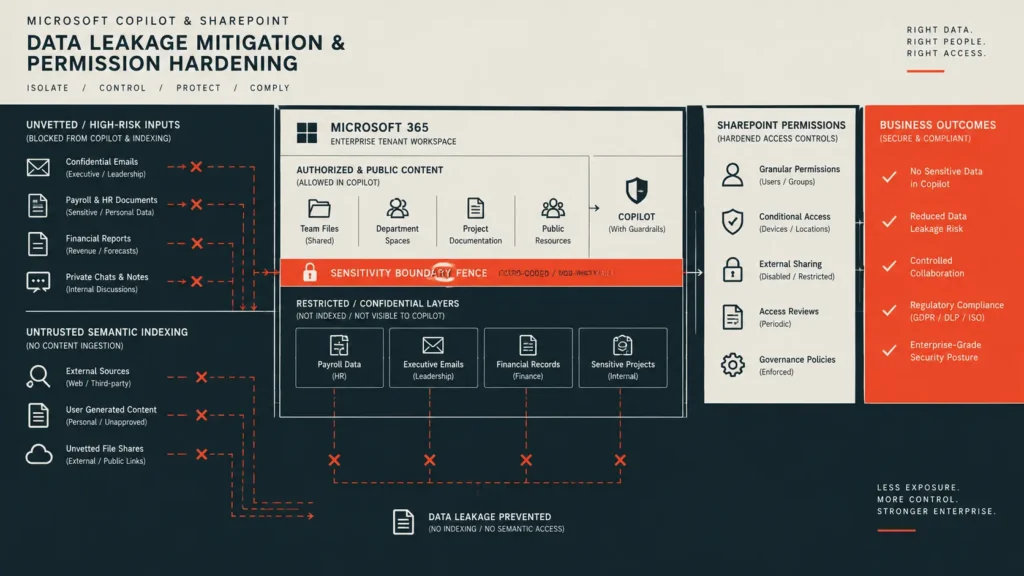
- Administrative access controls: Eliminating internal over-sharing variables shields your underlying host data architecture—mitigating microsoft copilot data leakage at the core requires that systems leads enforce absolute tenant-level permission templates rather than restricting the processing parameters of the model itself.
- Vendor/client parameter validation: Restructuring default internal data access settings eliminates high-risk document visibility pipelines; systematically strip out permissive sharing flags like the default “Everyone except external users” permission layer, which functions as the single largest exposure source across shared enterprise environments.
- Stream-optimized runtime flags: Monitoring classification attributes protects corporate intellectual property from unauthorized automated extraction—apply rigid Microsoft Purview sensitivity labels to force text processing engines to judge file eligibility based on absolute security tags, ensuring data classification dictates visibility rather than obscure folder placement.
- Perimeter isolation validation: Shielding core computing instances demands aggressive workspace segmentation rather than loose oversight—block semantic indexing paths across hyper-sensitive or high-risk corporate file repositories immediately to restrict model discovery routes while internal permission remediation sweeps are actively underway.
- Centralized threat mitigation registries: Countering security boundary decay dictates continuous validation testing at the directory edge—execute routine automated compliance drift checks and scheduled access reviews, as file directory parameters decay the exact moment manual surveillance loops stop.
Table of Contents
Enterprise scaleups and small businesses deploying collaborative AI workspaces under default tenant parameters routinely underestimate what they are actually exposing across their digital perimeters. The semantic indexing engine behind Microsoft Copilot does not distinguish a casually shared team onboarding document from a legacy corporate payroll sheet or a raw executive email thread.
Instead, it evaluates every single text file, spreadsheet, and archived thread that the current user technically retains administrative permission to view as fair context, completely ignoring how or why that specific permission vector was originally granted. Failing to programmatically isolate these dynamic integration paths allows automated collection scripts to scrape and index malicious string payloads, feeding them straight into model attention windows before internal teams can verify the data lineage.
This layout represents the core problem facing information managers: Copilot honors existing environment permissions faithfully, which sounds reassuring until you realize most organizations’ legacy site structures were never designed with an AI engine capable of conceptual semantic search in mind. A hyper-sensitive file buried six subfolders deep, which was previously discoverable only by an employee who already knew its exact filename, was functionally private under standard keyword search parameters.
Under conceptual semantic query indexing, that obscurity completely vanishes. Shifting past soft user-level constraints to construct a truly secure environment requires that systems leads map out absolute tenant-level permission templates to prevent microsoft copilot data leakage pathways from turning hidden files into corporate exposures.
Deciding to deploy an explicit, structural roadmap to construct strict validation parameters and mitigate microsoft copilot data leakage pathways is a critical operational engineering requirement, not a project that can wait for the next compliance audit cycle. It successfully prevents asset-handling drift, stabilizes enterprise procurement loops, and stops technical risk drift before a routine semantic query becomes an automated incident report that writes itself. Forcing these lifecycle constraints restricts local computing spaces to tight sandboxes, keeping your internal cloud processing nodes permanently partitioned, restricted, and clean.
There is a profound, stomach-dropping sense of technical disbelief that hits you when you sit inside a tenant-wide deployment audit and watch a basic model query completely shatter your security assumptions. We were evaluating our new workspace setup using an employee-level account profile that lacked any special administrative access rights. I typed a casual semantic search query like ‘executive salaries’ into the standard interface, and my heart sank as the model instantly returned unredacted company payroll spreadsheets, bonus structures, and confidential performance logs word-for-word.
It pulled these hidden records in seconds simply because an legacy administrative archive folder carried default, over-shared permission flags. Realizing that your internal AI platform functions as an automated scout for over-shared corporate records is a brutal wake-up call, proving that deep folder nesting models mean absolutely nothing if you leave the backdoor wide open to the model indexing engine.
The five vital blueprints detailed below provide a hardcoded checklist to translate these traditional isolation principles directly into active, tenant-level data governance boundaries.
The Core Blueprints of Tenant-Level Data Governance Mapping
MODULE 1: STRIPPING PERMISSIVE SHARING FLAGS AND ELIMINATING OVER-SHARED GROUPS
The inclusion of generalized organization-wide groups functions as the primary catalyst for severe enterprise microsoft copilot data leakage liabilities. These configuration holes rarely stem from deliberate administrative planning; instead, they operate as legacy system defaults left unreviewed long after a workspace site’s operational scope has transformed. A collaborative site provisioned years prior for a localized development sprint, then quietly adapted for general corporate storage, often still carries permissive organization-wide read access flags that make zero sense under modern security baselines.
- Execute a structured access review instead of an unmapped permission wipe: Compliance leads must avoid raw, blanket permission drops that risk breaking legitimate daily operational software workflows.
- Triage directory sweeps systematically by repository risk tier: Audit active sharing links and group membership matrices site by site, focusing resources immediately on locations known to store sensitive data fields—such as human resources directories, accounting subnets, legal documentation folders, and executive corporate communications—before migrating the verification sweep to the broader cloud tenant.
- Isolate and remediate broken permission inheritance anomalies: Pay explicit attention to directories where permission inheritance has been manipulated, as a library that silently diverged from its parent site’s restricted access model represents the exact type of structural data gap that traditional manual reviews fail to detect without an automated, systematic element sweep.
MODULE 2: IMPLEMENTING MICROSOFT PURVIEW SENSITIVITY LABELS AND ENCRYPTED CONTEXT FENCES
Implementing sensitivity labels shifts the primary control threshold from a file’s physical directory location to its explicit information classification status. This adjustment forms a significantly more durable information protection model, as document directory locations change constantly while security classifications remain bound straight to the file asset regardless of network migration. Configuring these classification profiles to explicitly restrict processing capabilities prevents microsoft copilot data leakage, ensuring that even if an employee possesses technical access permissions to a file, the model indexing daemon is blocked from parsing, surfacing, or summarizing the content within a natural language response.
- Deploy automated auto-labeling policies across all data ingest streams: Extend real-time protection to unclassified dark data repositories by applying automated policies that automatically tag documents containing sensitive string variables—such as national identification numbers, banking keys, or regulated corporate data fields—the exact millisecond they are created or discovered. This workflow eliminates the critical exposure window that exists before manual administrative classification occurs.
- Enforce model-specific data loss prevention (DLP) guardrails at the processing edge: Layer highly targeted DLP parameters directly on top of your master sensitivity label matrix. This configuration blocks the indexing system from summarizing or synthesizing highly confidential data blocks into a generated client answer, while still preserving direct file read capabilities for authenticated engineers who genuinely require the assets for engineering tasks.
- Decouple direct file access rights from model execution scopes: Ensure that authorization to view a document does not automatically translate into permission for the model to extract and blend that data into aggregate attention spaces, keeping corporate files partitioned, restricted, and clean.
MODULE 3: RESTRICTING SEMANTIC INDEXING PATHS AND HARDCODING EXCLUSIONS
Comprehensive permission cleanup and classification labeling require significant implementation windows, and a cloud tenant must not remain fully exposed while that remediation work is underway. Restricting which individual SharePoint repositories are discoverable through semantic search and Copilot in the interim—completely independent of underlying raw file access permissions—gives compliance teams an immediate containment window rather than forcing an all-or-nothing choice between full visibility exposure and disabling the collaborative AI platform entirely.
- Deploy temporary indexing constraints as tactical scaffolding: Compliance managers must treat discovery restriction layers as short-term protection rather than permanent architecture. Over-restricting discoverable content arrays degrades the actual operational utility Copilot is built to provide across the enterprise workspace.
- Narrow model discovery pathways specifically around high-risk subnets: Focus your containment perimeters tightly on known high-risk document silos—such as active accounting spreadsheets, legal documentation repositories, and executive corporate communications—while permission updates and Microsoft Purview automation catch up underneath.
- Align platform indexing rules directly with primary vendor specifications: Infrastructure teams configuring this containment layer must work straight from the official Microsoft Learn data governance and access lifecycle documentation to map out their settings. Grounding your procedures in these public directives guarantees that discovery restriction rules, sensitivity tags, and targeted data loss prevention frameworks function together as layered controls to systematically resolve microsoft copilot data leakage scenarios without introducing architecture conflicts across your tenant environment.
MODULE 4: AUTOMATED COMPLIANCE DRIFT SWEEPS AND ACCESS VALIDATION CADENCES
A permission cleanup completed once functions merely as a point-in-time snapshot rather than a reliable operational control. New collaborative workspaces get provisioned daily, corporate group memberships change, and a well-intentioned employee resharing a single nested directory can silently reintroduce the exact visibility exposure patterns that your security team just remediated. Without a recurring, automated validation cadence, the organization’s actual threat perimeter drifts steadily away from whatever the last compliance audit documented, silently accelerating microsoft copilot data leakage windows.
- Route recurring access reviews straight to localized site owners: Triage teams must automate access reviews directly to the line-of-business site managers who hold accurate contextual awareness of current access requirements—rather than leaving a centralized IT team to guess at operational intent. This localized review catches configuration variances before they compound into systemic vulnerabilities.
- Establish secure, hardened provisioning defaults for newly created sites: Close the data isolation loop by hardcoding restrictive baseline permission templates for all new SharePoint and Microsoft 365 group creations. Enforcing zero-trust inheritance by default ensures that new over-sharing risks cannot creep back into your network through channels the original remediation lifecycle never touched.
- Verify model indexing bounds using automated configuration sweeps: Systems leads must implement automated script checkpoints to continually verify that restricted administrative folders, accounting ledgers, and executive subnets remain completely blocked from background ingestion sweeps over time.
MANDATORY OPERATIONAL DISCLOSURE PAPERS & AUDITING BOUNDARIES
A resilient data privacy and safety posture operates as an active, ongoing system engineering discipline rather than a static boardroom compliance checkbox signed off once an audit cycle and forgotten. Deep telemetry across cloud collaboration platforms makes the operational path clear: achieving true infrastructure resilience requires corporate teams to treat permissive flag elimination, Microsoft Purview sensitivity labels, semantic search exclusions, and automated compliance drift sweeps as a single, code-enforced technical matrix to protect their internal systems permanently.
Assuming your organization is secure from model over-sharing simply because you have a standard intranet site setup introduces a highly dangerous and severe false sense of security across your operational divisions. Traditional keyword searches rely on exact phrase matches, allowing poorly named files to remain hidden by obscurity. Conversely, AI-driven semantic queries decode conceptual meanings and user intent—blowing right past obscure file naming strategies or deep subfolder nesting models to uncover sensitive files instantly. If you operate without a hardcoded microsoft copilot data leakage strategy to explicitly block model ingestion paths, a single over-shared folder tag will transform your internal data repositories into an automated data-exfiltration pipe for unauthorized employee inquiries.
CONCLUSION & GOVERNANCE BOUNDARY SUMMARY
A resilient privacy and identity safety posture operates as an active, ongoing system engineering discipline rather than a static boardroom compliance checkbox reviewed once a year and forgotten. Diligent tenant permission cleanup, granular sensitivity labeling, semantic indexing restrictions, and recurring drift sweeps only function as a genuine control matrix when maintained continuously against a cloud workplace environment that keeps changing underneath them.
Preventing microsoft copilot data leakage was never really about restricting what the AI is capable of executing—it is about permanently closing the gap between what your organization’s permissions technically allow and what your organization actually intends anyone to find. Maintaining an unyielding governance posture requires risk officers to continuously refine their infrastructure perimeters against structural validation decay, transforming internal tracking metrics into active programmatic limits to ensure your business preserves private data access permanently.
Balancing high-velocity cloud workspace collaboration with rigid model ingestion isolation remains one of the ultimate orchestration challenges facing modern DevSecOps architects and platform engineers. We invite you to join the technical discussion in the comments section below: What specific passive scanning architectures, framework tracking layers, or automated log monitoring platforms do you currently use to audit your infrastructure perimeters against global threat matrix indexes and manage your microsoft copilot data leakage profiles? Have you successfully shifted your vendor assessments to hardcoded metric calculations, or are you running basic quarterly dashboard reviews during staging builds? Drop your organizational workflows, active directory patterns, and hard-earned runtime security advice with the engineering community below!
Related: Data Retention Policy: 4 Practical Rules to Stop Compliance Drift – A strong data retention policy turns regulatory compliance into automated control—classify, retain, purge, and continuously verify every record.
AI Safety Risk Register: 4 Masterful Frameworks to Stop Compliance Drift – Enterprise AI safety isn’t just about compliance—it’s about tracking risks, ownership, data exposure, and mitigation before they become deal-breakers.
Indirect Prompt Injection: 7 Elite Strategies to Shield Corporate Networks – A practical guide to mitigating indirect prompt injection in RAG systems using trusted data pipelines, input sanitization, retrieval controls, and output validation to prevent malicious content from influencing AI responses.
Secure Docker LLM Deployment: 5 Practical Blueprints to Shield Corporate Networks – A practical guide to hardening containerized LLM environments against misconfigurations, exposed services, and AI-specific security threats.
Block Grok AI Scraping: 4 Vital Adjustments to Shield Corporate Networks – A practical guide to blocking Grok AI scraping on X, using privacy controls, access restrictions, and defensive measures to reduce unauthorized use of brand content for AI training and data extraction.
Write Incident Response Plan: 5 Urgent Blueprints to Shield Corporate Networks – A practical five-step framework for building an incident response plan with severity-based triage, secure out-of-band communication, defined containment roles, regulatory notifications, and recurring simulation drills.
FREQUENTLY ASKED QUESTIONS (FAQ)
Q1. If an administrator applies a Microsoft Purview sensitivity label to a document container, how long does it take for Copilot to respect the new context fence and drop it from search results?
Tenant compliance leads must account for a synchronization latency window where the underlying search index updates. While direct file access limits apply instantly across the network surface, Copilot’s semantic processing graph can take up to 24 hours to re-index the repository modifications and completely purge the data tokens from employee conversational windows.
Q2. Does disabling the “Allow search indexing” toggle inside a SharePoint site settings panel block Copilot without altering standard web browser access for team members?
Yes, shifting this specific repository indexing flag completely cuts off the site from the tenant’s background graph crawling daemons. This configuration ensures that standard authenticated users can still navigate to and view files directly via the browser interface while ensuring the model remains entirely blind to the site’s contents during semantic chat tasks.
Q3. How do corporate data retention rules interact with Copilot’s summary history logs if an employee accidentally surfaces over-shared data before permissions are hardened?
Tenant managers must configure a targeted retention architecture within the Microsoft 365 compliance center to manage model prompt and response storage lifecycles. Enforcing a strict, short-lived deletion cadence on user chat records ensures that if sensitive records are temporarily surfaced, the leaked tokens are permanently purged from internal system logs rather than persisting inside hidden corporate backup arrays.
Q4. If our enterprise team uses third-party sync connectors to mount external storage spaces like Box or Google Drive into SharePoint, does Copilot index those external files automatically?
Yes, any external cloud file arrays brought into the Microsoft 365 workspace via integrated content connectors inherit the primary tenant graph scanning permissions by default. IT infrastructure teams must establish separate, dedicated access validation layers across these connection gateways to ensure third-party metadata fields are completely cataloged and restricted before activating model compute licenses.
Q5. What is the primary operational failure small business administrators commit when deploying Microsoft 365 Copilot licenses to localized sales or marketing teams?
The primary bottleneck is failing to disable universal link sharing permissions across collaborative document folders prior to rollout. Leaving default platform link configurations open allows employees to generate anonymous organization-wide access paths whenever they copy a link, instantly expanding the model’s ingestion surface to encompass internal business files that should remain highly restricted.
DISCLAIMER
Educational Notice: This article is published on AI Security Watch strictly for technical educational and general cybersecurity awareness purposes. The configurations and research discussed are based on public threat intelligence data. This content does not constitute professional IT architecture, legal, or financial advice. Because network configurations vary, always verify settings in an isolated test environment or consult with a qualified engineer before modifying live hardware or registries. AI Security Watch contains informational links to external resources; we are not responsible for third-party site accuracy or platform content.