
⚡ TL;DR — Key Takeaways
- Enforcing Application Control gates: Deploying strict AppLocker or Windows Defender Application Control (WDAC) deny-by-default rules ensures that unapproved binaries tied to threat actor rmm usage are permanently blocked from executing out of local user profiles or temporary system directories.
- Insulating Network Perimeter Egress: Configuring network-layer telemetry egress filtering parameters across your firewall and DNS architecture automatically drops outbound connections attempting to reach known remote-access C2 gateways or unsanctioned RMM vendor domains.
- Neutralizing Portable Deployment Paths: Hardening endpoint group policy software restriction rules kills portable, no-install remote desktop executables in real time before they can establish an unmonitored reverse tunnel into your environment.
- Operationalizing Continuous Audit Trails: Securing persistent registry tracking and security event logging logs requires continuously monitoring Windows Security Event ID 4688 and Sysmon process-creation entries to flag unauthorized remote management tools the exact millisecond they spawn.
Table of Contents
Modern ransomware syndicates have largely abandoned loud, custom-built malware payloads in favor of quieter, evasive tradecraft. Rather than triggering antivirus behavioral heuristics with a novel exploit string, intrusion crews now routinely deploy commercial, digitally signed Remote Monitoring and Management (RMM) utilities that are already widely trusted by IT departments globally.
This operational shift matters because these binaries are never flagged as malicious on their own by legacy defense perimeters. A signed AnyDesk, TeamViewer, or ScreenConnect installer looks entirely identical whether an authorized internal help-desk technician or a malicious intruder launched it. That baseline architectural ambiguity is precisely what makes threat actor rmm usage so difficult to isolate with traditional signature-based security tools alone.
Comprehensive industry breach research, including the system-intrusion sections of the Verizon Data Breach Investigations Report (DBIR), has tracked a sustained, year-over-year rise in threat actor rmm usage across corporate perimeters. These management utilities slip past standard antivirus filters because they operate as legitimate software with valid corporate certificates, rather than disguised or obfuscated executables.
This pattern is heavily corroborated by government threat intelligence indicators as well. The Cybersecurity and Infrastructure Security Agency (CISA), the NSA, and the MS-ISAC jointly published a binding advisory titled “Protecting Against Malicious Use of Remote Monitoring and Management Software“. The brief details real-world cyber campaigns in which adversaries deployed portable AnyDesk and ScreenConnect executables—without ever initiating a formal local software installation—to completely bypass administrative application blocks and establish permanent command-and-control channels on victim endpoints.
The practical consequence of this trend is that “living off the land” via commercial remote-access tools has become one of the most common ways attackers maintain long-term, stealthy footholds inside compromised corporate networks. Intruders routinely sit silently inside an environment for weeks conducting data staging before encryption loops or bulk exfiltration pipelines are initialized.
There is an immense, exhausting frustration that hits an incident response team when they pull the root-cause forensic timeline for a massive active data breach, expecting to uncover a highly sophisticated zero-day exploit or an elite nation-state code block—only to discover that the adversary walked right past their multi-million dollar defense array simply by downloading a standard, free, off-the-shelf remote control utility straight onto a production server. Realizing that your perimeter was cracked because a non-admin account pulled an unmonitored portable binary from a public website and let an outsider set up a permanent reverse shell makes you realize how easily legacy signature scanners are fooled by legitimate, signed software. It shifts your mindset entirely away from hunting exotic malware and focus-locks you on strict application execution control.
The five targeted controls detailed below are engineered to systematically close this legitimate-software exploitation gap, moving your perimeter from blind execution trust to rigid group policy, network filtering, and behavioral logging enforcement.
CONTROL 1: IMPLEMENTING APPLICATION CONTROL AND ALLOWLISTING POLICIES
Application control is the first and most direct line of defense against threat actor rmm usage, because it stops unauthorized remote-access binaries from ever running, regardless of how they arrived on the endpoint.
- Step 1 — Establish an Enforced Posture: Establish a deny-by-default posture to cut off threat actor rmm usage at execution. Deploy Windows Defender Application Control (WDAC) or AppLocker in enforced (not audit-only) mode, starting from a baseline that permits only digitally signed, organization-approved executables.
- Step 2 — Deny Unsanctioned Commercial Binaries: Explicitly block known commercial RMM binaries by creating publisher and hash-based deny rules for tools your organization has not sanctioned, including AnyDesk, TeamViewer, ConnectWise Control, and similar utilities. Even if one of these is approved for IT use, restrict it to signed installers launched from an approved path—never a portable executable dropped elsewhere.
- Step 3 — Target User-Writable Paths: Configure AppLocker path rules to explicitly block executable launches from:
%LOCALAPPDATA%\and its subfolders%TEMP%andC:\Windows\Temp\Downloadsand other user-profile folders where a non-admin account can write files.
- Step 4 — Stage via Group Policy Objects: Roll out your rules via Group Policy Objects (GPOs) scoped to workstation and server Organizational Units (OUs). Validate for two weeks in audit-only mode to catch legitimate business exceptions, then flip to enforced.
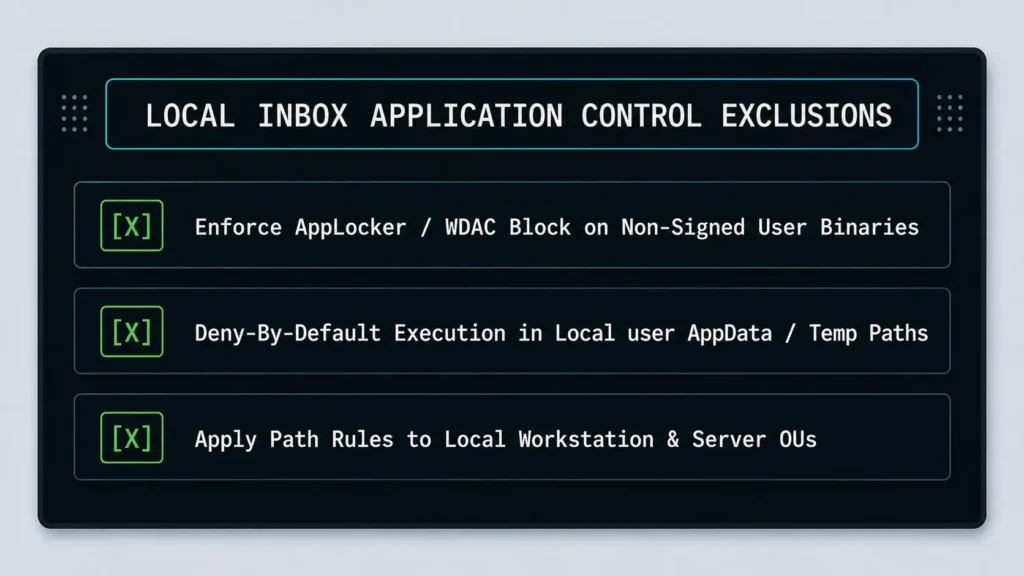
Failing to block execution from user-writable directories leaves a massive open gateway into your environment. Even if your employees do not have local administrative privileges, a standard user account can still download a portable, no-install remote management tool and run it directly out of their local profile folders. If your Group Policies do not strictly seal off path executions inside the AppData or Temp trees, you are allowing unprivileged users to accidentally bypass your entire administrative hierarchy and hand intruders a wide-open reverse shell.
Application allowlisting alone will not catch every modified variant, which is why it must be paired with network-layer controls.
CONTROL 2: ENFORCING EGRESS TRAFFIC FILTERING FOR RECONNAISSANCE DOMAINS AND THREAT ACTOR RMM USAGE GATEWAYS
Even when a binary executes, it still needs to call home. Severing that path is the second pillar for containing threat actor rmm usage.
- Step 1 — Build a DNS-Layer Denylist: Deploy a DNS filtering service or firewall category feed that automatically blocks known remote-access relay domains and RMM vendor telemetry endpoints that do not reside on your approved-vendor whitelist.
- Step 2 — Enforce a Default-Deny Egress Model: Restrict outbound firewall rules to a default-deny posture. Instead of allowing all outbound traffic, permit only the specific ports and destinations required for business operations, then log and alert on any outbound connection attempt that fails to match an approved rule.
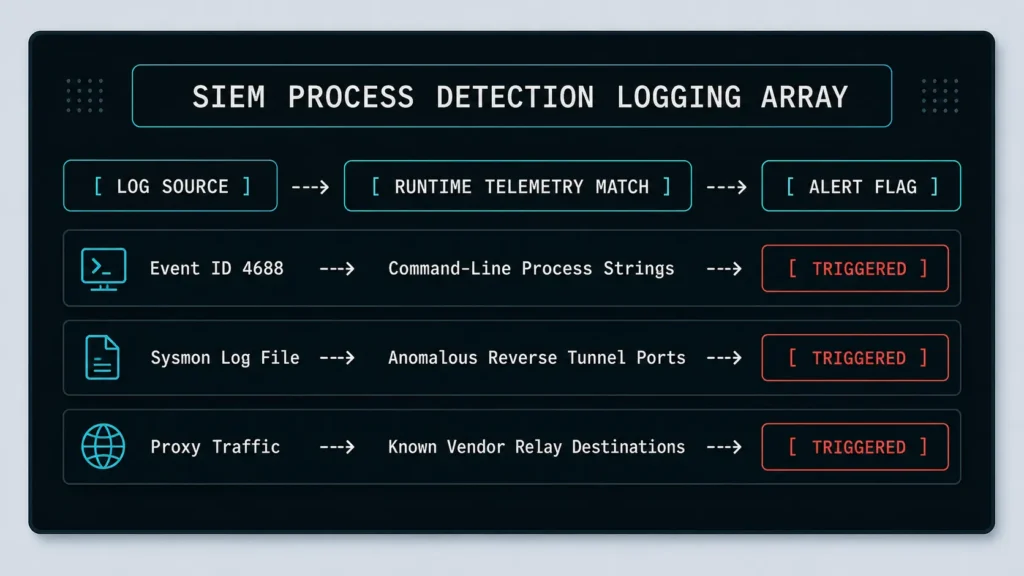
- Step 3 — Monitor Anomalous TLS/SNI Patterns: Many RMM tools use recognizable certificate fingerprints or Server Name Indication (SNI) hostnames. Feed proxy and firewall logs into your SIEM to systematically flag connections matching known remote-control gateway signatures.
- Step 4 — Isolate Server Networks from General Internet Egress: Ensure production and server VLANs have no direct outbound internet access by default, requiring an explicit proxy exception for any legitimate business need.
CONTROL 3: HARDENING ENDPOINT GROUP POLICIES TO KILL PORTABLE BINARIES
Portable, “no-install-required” RMM tools are a favorite for adversaries because they leave a lighter footprint than a full software installation. Hardening your Group Policy Objects (GPOs) and enforcing Software Restriction Policies (SRP) closes this gap directly.
- Step 1 — Configure SRP Hash and Certificate Rules: Deploy SRP hash and certificate rules in tandem with AppLocker to catch portable executables that bypass typical installer-based detection matrices.
- Step 2 — Disable Execution from Removable Media: Restrict execution from removable media and unmanaged mount points via GPO, since portable tools are frequently launched from a local USB drive or an unverified network share.
- Step 3 — Restrict Background Service Creation Rights: Deny background service creation rights for standard users so a portable remote-access binary cannot register itself as a persistent background service or scheduled task without explicit administrative approval.
- Step 4 — Push GPO Updates Centrally: Enforce centrally pushed GPO updates and audit for configuration drift. Use Group Policy compliance reporting to confirm that endpoints have not reverted to unrestricted defaults after imaging or reprovisioning.
CONTROL 4: DEPLOYING PERSISTENT LOGGING AND A SIEM THREAT HUNTING MATRIX FOR THREAT ACTOR RMM USAGE
Detection is the safety net for anything that slips past Controls 1–3, and it is where most confirmed cases of threat actor rmm usage are ultimately discovered.
- Step 1 — Enable Advanced Process Creation Logs: Enable and centralize Windows Security Event ID 4688 (process creation) with command-line auditing turned on, allowing you to capture the full launch parameters of every executable rather than just its file name.
- Step 2 — Optimize System Monitor (Sysmon) Deployments: Deploy Sysmon with a configuration tuned to flag process creation, network connection, and image-load events tied to known remote desktop executable names and cryptographic hashes.
- Step 3 — Construct SIEM Correlation Rules: Build SIEM correlation rules that alert when an unapproved remote-access binary launches on a server, especially outside business hours or immediately before large file-access or backup-deletion activity—a common precursor to encryption.
- Step 4 — Maintain a Dynamic Threat Intel Watchlist: Maintain a living hash and certificate-thumbprint watchlist of RMM tools observed in incident response engagements and threat intelligence feeds, feeding it back into both your SIEM and your AppLocker/WDAC deny rules.
CONTROL 5: IMPLEMENTING MANDATORY OUT-OF-BAND ACCESS CHECKPOINTS AGAINST THREAT ACTOR RMM USAGE
Technical perimeter controls only function effectively if legitimate remote administration has an equally rigorous, auditable path. This control tightly governs authorized remote access so it never has to compete with or mask unauthorized threat actor rmm usage across your network boundaries.
- Step 1 — Mandate Just-in-Time Ticketing: Require a time-bound, just-in-time access ticket before any remote administration session is permitted on a production endpoint. If no active, approved ticket exists, the session must be automatically rejected.
- Step 2 — Enforce Conditional Connectivity Gates: Isolate endpoints from remote-access tooling by default using network access control (NAC) or conditional access policies that only unlock RMM connectivity for the exact duration of an approved ticket window.
- Step 3 — Route Sessions via PAM or Jump Hosts: Route all approved administrative sessions through a single, heavily monitored jump host or Privileged Access Management (PAM) solution, completely forbidding direct RMM connections to individual production endpoints.
- Step 4 — Execute Post-Session Activity Audits: Log, review, and record every single out-of-band session post-closure. Cross-examine the actual runtime process execution logs against the ticket’s stated operational scope to flag any lateral movement.
CONCLUSION & PERIMETER ISOLATION SUMMARY
A resilient infrastructure security posture treats every unapproved remote administration binary as an active intrusion compromise, rather than a simple policy violation to be addressed during a later administrative cycle. The five core risk management controls established across this manual—baseline application allowlisting, strict network egress traffic filtering, endpoint GPO hardening against portable binaries, persistent process logging via SIEM systems, and mandatory out-of-band checkpoints—form a highly layered, zero-trust defense. This architecture effectively closes the operational gaps that malicious groups exploit when they rely on trusted, signed IT tools instead of compiling loud, custom-built malware payloads.
Left unaddressed, undetected threat actor rmm usage will continue to serve as one of the quietest, most effective vectors for threat groups to maintain persistent access and execute lateral movement inside corporate networks. Achieving a sustained reduction in this threat surface requires treating remote desktop containment as a permanent, standing governance program rather than a one-time hardening project.
Hardening an enterprise network against the exploitation of trusted IT tools requires moving from simple signature scans to strict application execution controls. What specific remote control utilities, advanced endpoint monitoring rules, or group policy parameters does your operational team leverage to keep unauthorized remote tools isolated? Have you run into internal pushback from support staff when locking down user-writable paths like AppData or Temp? Drop a comment below and share your experience—let’s swap our defensive architecture tips and secure our endpoints together!
Related: Building an ISMS Framework in 5 Strategic Steps to Pass External Audits – Building an ISMS framework gives organizations a structured way to identify information-security risks, implement effective controls, and continuously improve their security posture.
Neutralizing Corporate Identity Theft Exposures Via 6 Proven Controls – Neutralize corporate identity theft by combining credit protection, domain takedowns, email authentication, registry monitoring, brand alerts, and payment verification into one layered defense.
Stopping Email Tracking Pixels Via 5 Rigid Rules to Prevent Spy Attacks – Stop invisible email surveillance by blocking tracking pixels, stripping telemetry links, and hardening your inbox with layered privacy controls.
Conducting a HIPAA Assessment Via 4 Rigid Control Measures – A rigorous HIPAA assessment turns healthcare data protection into a continuous process of mapping PHI, enforcing access controls, validating encryption, and managing third-party risk.
FREQUENTLY ASKED QUESTIONS (FAQ)
Q1. Will blocking portable RMM binaries also break legitimate IT helpdesk tools we already rely on?
Not if you sequence the configuration rollout correctly. Run AppLocker/WDAC and SRP rules in audit-only mode for at least two weeks before enforcing them, and build an explicit allowlist entry—backed by a publisher certificate rather than a generic filename—for whichever RMM tool your helpdesk is contractually authorized to use. Anything outside that defined parameter gets dropped by default, ensuring your sanctioned support pipelines keep working uninterrupted.
Q2. How do we tell the difference between our own internal IT team using a remote tool and an attacker doing the exact same thing?
This visibility bottleneck is exactly what the out-of-band ticketing system solves. If every legitimate internal session requires a time-bound ticket routed strictly through a designated jump host or Privileged Access Management (PAM) gateway, then any remote desktop session that surfaces in your system logs without a matching ticket is presumptively unauthorized—eliminating the need to guess based on behavior alone.
Q3. Our organization is too small to run a full SIEM infrastructure. Can we still catch threat actor RMM usage?
Yes. At a minimum, enable command-line auditing on Windows Security Event ID 4688 and forward those local logs to a low-cost central log aggregator or a hardened syslog server. Combining that foundational tracking setup with a maintained hash or certificate watchlist of common remote utilities—and running manual weekly review sweeps—closes the vast majority of the detection gap a full SIEM would normally handle.
Q4. What is the actual structural difference between AppLocker and WDAC, and which one should we actually deploy?
AppLocker is significantly easier to configure and works well for environments that need granular per-user or per-group policy flexibility, but it only runs on certain premium Windows enterprise editions. WDAC is kernel-enforced, much harder for an advanced adversary to bypass, and works across more SKUs, but it carries a far steeper setup and policy-authoring curve. Lean organizations frequently implement AppLocker first for speed and migrate to WDAC once their baseline parameters stabilize.
Q5. If an employee needs a specific RMM tool for a one-off vendor support session, how do we allow it without permanently opening a hole in our defenses?
Utilize a time-boxed exception process tied straight to your out-of-band ticketing workflow. Approve the specific incoming binary’s cryptographic hash for a strictly defined window (such as a 4-hour block), log the session metrics, and let the AppLocker/WDAC rule auto-expire or get manually revoked immediately afterward. This method avoids leaving a standing, forgotten allowlist entry that outlives its legitimate business need.
DISCLAIMER
Educational Notice: This article is published on AI Security Watch strictly for technical educational and general cybersecurity awareness purposes. The configurations and research discussed are based on public threat intelligence data. This content does not constitute professional IT architecture, legal, or financial advice. Because network configurations vary, always verify settings in an isolated test environment or consult with a qualified engineer before modifying live hardware or registries. AI Security Watch contains informational links to external resources; we are not responsible for third-party site accuracy or platform content.