
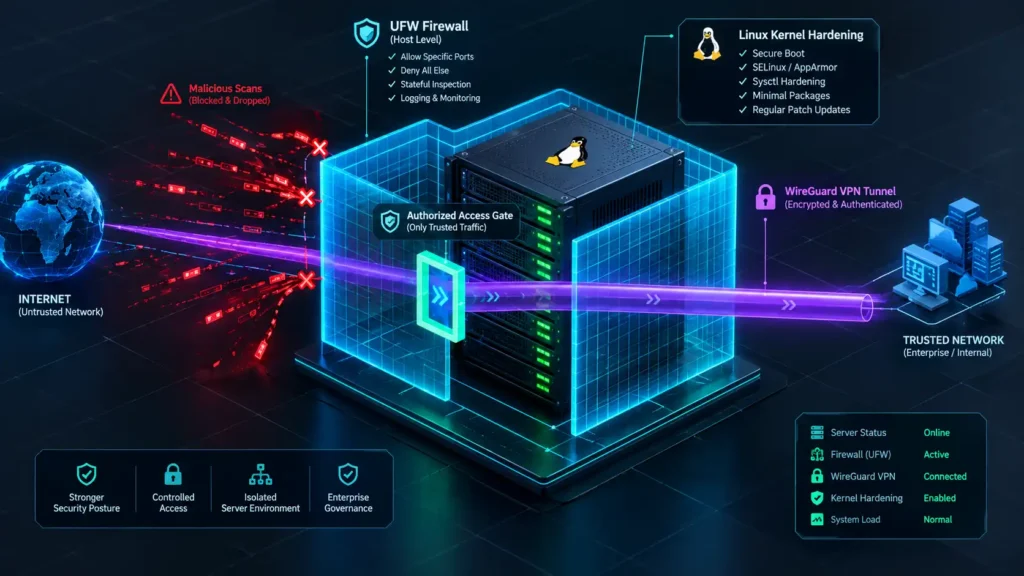
⚡ TL;DR — Key Takeaways
- Administrative access controls: Establishing absolute transport layer isolation across your kernel requires immediate, low-level routing containment—a secure linux ufw firewall wireguard implementation begins with the programmatic restriction of kernel-level IP forwarding masks, ensuring that raw packet transport hooks are fully governed before any surface application layers execute.
- Vendor/client parameter validation: Systematically narrow your public-facing entry points to isolate the host from high-velocity network scanning campaigns; you must explicitly scope the virtual interface handshake port strictly to the active public interface requiring access, dropping all adjacent communication scopes by default.
- Stream-optimized runtime flags: Automate system interface rulesets to permanently block persistent execution drift when network states cycle; embedding explicit PostUp and PostDown masquerading commands directly into the virtual adapter initialization file is what technically wires the encrypted tunnel into your core network address translation (NAT) infrastructure.
- Perimeter isolation validation: Prevent security posture degradation across your cloud infrastructure by executing active adversarial validation testing; do not rely on static configuration logs alone, but rather run external, out-of-band network port scans against your host instance to verify that all unauthenticated connection requests are dropped.
Table of Contents
Deploying an open-source VPN tunnel without an active, rigid host-level packet filter leaves your cloud server instances highly vulnerable to automated internet scanning sweeps and rapid external reconnaissance campaigns. Because the underlying protocol functions silently by design to mitigate fingerprinting, unshielded User Datagram Protocol (UDP) listening ports are discovered by high-velocity scanning networks within minutes of going live on a public IP address. Failing to restrict access to this transport vector allows remote threat actors to map your edge interfaces, run distributed brute-force handshake sweeps, and actively position themselves to conduct unauthorized network sniffing or exploit unpatched kernel-level transport flaws.
Deciding to deploy an explicit, hardened policy layout using linux ufw firewall wireguard parameters is a mandatory, core network engineering requirement rather than a secondary configuration optimization step. Operating without interface-specific packet validation rules enables rogue peer nodes and unverified routing streams to hit your network boundary completely unhindered. Enforcing a disciplined host firewall array is the only technical mechanism that successfully closes default exposure windows, drops spoofed packet payloads at the physical adapter layer, and completely blocks malicious entities from exploiting listening ports before your legitimate, authorized enterprise peers ever initiate a cryptographic connection.
There is a profound, stomach-churning sense of technical disbelief that hits you when you conduct a routine infrastructure server audit and discover that a systems administrator spun up a production-level WireGuard endpoint with completely open system-forwarding parameters. You look at the active configuration files and realize that they left the main packet routing loops running wide open without a single interface constraint, effectively transforming a secure encrypted tunnel into a wide-open public bridge.
It is a terrifying realization that your multi-layered corporate perimeter defenses mean absolutely nothing if a single unhardened cloud gateway is blindly passing unauthenticated data packets from the raw web straight into your internal private network segments, giving any remote attacker an open, encrypted bypass directly to your core database clusters.
The five actionable optimization practices detailed below transform this default host vulnerability into a locked-down, centrally governed network architecture. By systematically establishing kernel-level forwarding masks, isolating active UDP handshake endpoints, and injecting rigid interface-specific masquerading rules, network administrators can guarantee that their Linux environment actively shields internal communication loops from public exploitation.
STEP 1: HARDENING THE KERNEL TRANSPORT LAYER VIA IP FORWARDING MASKS
Before any external packet-filtering rules can take effect, the underlying Linux kernel transport layer must be programmatically configured to route data packets between your physical and virtual network adapters. Leaving the host operating system at its factory security defaults will cause the kernel to drop cross-interface traffic, rendering your private network tunnel completely unusable.
- Enable IPv4 packet forwarding at the kernel level: Encrypted traffic destined for protected internal subnets requires your hosting server to operate actively as an intermediary router; this operational path can only initialize when you explicitly toggle the system’s core forwarding flag to its active state, overriding the restrictive out-of-the-box defaults.
- Enforce symmetrical IPv6 forwarding rules for dual-stack environments: If your cloud architecture leverages modern dual-stack addressing networks, you must ensure that both IP forwarding variables are configured identically across your network profiles; failing to align these transport parameters will cause your IPv6 endpoints to suffer silent routing failures while your IPv4 connections continue to function normally.
- Commit the transport variables persistently to prevent reboot rollbacks: Modifying live kernel memory variables via temporary terminal flags introduces immediate security drift because the settings will completely vanish upon the next system power cycle; you must hardcode these networking boundaries directly into your persistent system runtime settings to ensure the environment survives a cold reboot.
- Restrict the system routing pool strictly to authenticated traffic blocks: Setting global packet-forwarding capabilities inside your operating system parameters does not mean your server will loosely forward any data payload that hits your physical ethernet ports; the architectural objective of a hardened linux ufw firewall wireguard deployment is to ensure the core network stack only forwards packets that have already passed through your virtual interface’s native cryptographic handshakes.
STEP 2: ISOLATING THE UDP HANDSHAKE LISTENING PORT
The listening endpoint on your virtual network adapter serves as the primary external gateway for this entire deployment. This high visibility makes precise port scoping a critical operational requirement. Leaving this transport entry point open without interface constraints exposes your server to automated, distributed reconnaissance sweeps.
- Restrict network rules exclusively to the designated UDP port: The initial handshake sequence and all subsequent encrypted data streams traverse a single, specific port (typically UDP port 51820). Your packet-filtering parameters must match this socket exactly, moving completely away from the dangerous practice of opening broad, generic port ranges to accommodate connectivity.
- Bind the incoming transport rule to your active public interface: Ensure that your network rules are locked strictly to the physical network card connecting your machine to the public web. Failing to enforce explicit interface mapping allows incoming traffic configurations to apply globally across all network adapters on the host, inadvertently exposing internal maintenance lines to public-facing traffic. This precise boundary mapping is a critical habit for network administrators, directly extending to how we structure web application firewalls to block credential stuffing and automated bot floods at our primary public data interfaces.
- Enforce explicit separation boundaries to block adjacent scanning ranges: Automated reconnaissance scripts continuously sweep sequential ports to locate active services. Restricting your rules tightly around your active tunnel socket prevents threat actors from using a single discovery to locate and pivot into unhardened, adjacent background services.
- Coordinate rule initialization with virtual interface deployment schedules: Do not activate your packet-filtering rule until your tunnel configuration parameters have been fully committed and validated internally. Opening the listening gateway while your virtual interface remains misconfigured creates a high-exposure window where the port is publicly reachable but cannot yet properly authenticate incoming client handshakes.
STEP 3: ENFORCING INTERFACE REGISTRATION AND POST-UP/POST-DOWN NETWORKING MASKS
This phase marks the precise transition where linux ufw firewall wireguard configurations move beyond static firewall rule sheets and integrate directly into the VPN’s native interface lifecycle. By embedding structural routing scripts that execute automatically during interface bring-up and teardown loops, network engineers can guarantee clean packet flow without manual administrative intervention.
- Append iptables and masquerading rules directly to the WireGuard configuration: Injecting explicit
PostUpandPostDowndirectives directly inside your/etc/wireguard/wg0.confconfiguration profile allows you to programmatically hook network address translation (NAT) and packet masquerading arrays to the exact millisecond the interface initializes, rather than managing them as a separate, easily forgotten script.
- Ensure PostDown rules cleanly reverse whatever PostUp applied: Every single firewall forwarding rule introduced during the interface initialization must have a perfectly symmetrical teardown mask mapped to the
PostDownline; failing to match these directives will leave duplicate, stale entries accumulating inside your active kernel firewall tables every time the tunnel cycles.
- Reference authoritative deployment guidance while building this configuration: Engineering teams constructing this core interface lifecycle automation layer should align their technical formatting directly with the official Ubuntu server security administration blueprints. This authoritative source reference details the expected runtime interactions between UFW, raw iptables chains, and interface-triggered routing changes across modern Ubuntu systems.
- Test interface bring-up and teardown loops independently: Before passing live corporate traffic arrays through your encrypted tunnel, manually cycle the interface using native system commands to confirm that the embedded networking tasks execute flawlessly without throwing syntax exceptions or bottlenecking the host processor.
STEP 4: EDITING THE UFW DEFAULT FORWARDING CUSTOM POLICY TEMPLATE
This engineering tier addresses the single most common configuration pitfall where a linux ufw firewall wireguard implementation silently fails to route network packets entirely. Failing to modify the baseline security parameters of the host firewall utility completely breaks downstream connectivity, even if your underlying kernel and virtual adapters are running flawlessly.
- Recognize the default forwarding trap: Standard out-of-the-box UFW installations ship with a strict, baseline global policy that automatically drops all packet-forwarding traffic across system interfaces. This design directly conflicts with the primary function of a virtual private network, which requires your server to act as a routing middleman to pass data between the encrypted tunnel and internal local network segments.
- Shift the default forward policy from DROP to ACCEPT carefully: Modify the global forwarding state variable inside the central UFW initialization template file located at
/etc/default/ufw. This network adjustment must be treated as a deliberate, documented architectural pivot within your configuration records rather than a casual fix executed without evaluating your wider transport layout.
- Lock down interface boundaries in the before-rules template: Setting the global forwarding parameters to allow transport traffic is only half the battle. You must immediately open the underlying firewall rules configuration file at
/etc/ufw/before.rulesto hardcode rigid filters that constrain that open routing baseline, ensuring the system strictly drops any forwarding request that does not originate from or terminate within your explicit virtual adapter subnets.
Blindly modifying your global firewall forwarding variables to allow open traffic routing without immediately pinning your rules to the explicit wg0 virtual interface creates a catastrophic security backdoor on your server. If you leave this broad forwarding policy unconstrained within your network rules files, your machine will loosely route any data packet that lands on your public network adapters. This structural oversight allows unauthorized external actors to manipulate your open routing pipelines to tunnel malicious scripts straight into your private subnets—completely bypassing your surface-level firewall perimeters and turning your trusted infrastructure into an open gateway for threat actors.
STEP 5: VALIDATING PERIMETER ISOLATION VIA LIVE ADVERSARIAL PORT SWEEPS
A network layout that appears immaculate within text configuration blueprints must still be aggressively verified under live, adversarial conditions before deployment. Relying on paper metrics without verifying your perimeter controls can leave your network vulnerable to silent configuration degradation and unmapped security drift.
- Run automated external port checking tools: Execute a comprehensive external vulnerability scan against your public-facing IP address from a completely separate cloud node or an out-of-the-box machine. This external vantage point provides a transparent view of exactly what a remote threat actor or automated internet sweep maps during reconnaissance, removing internal administrative assumptions.
- Check live connection snapshots via verbose firewall status logs: Run real-time monitoring commands to view detailed packet filtering metrics on the host. Analyzing the verbose output of your linux ufw firewall wireguard deployment allows security analysts to confirm which explicit rules are actively intercepting and parsing data traffic, instantly surfacing any overlapping rules that failed to apply as intended.
- Run mock terminal link disruptions to test fail-safe logic: Deliberately terminate active client handshakes, cycle network interfaces unexpectedly, and forcefully drop active connection strings. Observing how your server and virtual adapters respond under stress confirms that your architecture degrades into a tight, fail-secure state rather than falling back into an unhardened, open configuration.
- Confirm unauthenticated traffic is dropped instantly without metadata leakage: The definitive validation test for your host perimeter is absolute: any incoming packet payload that has not successfully negotiated a cryptographic handshake must be dropped instantly at the external interface. The firewall must sever these unverified connections with zero return telemetry, ensuring that no internal network mapping data or sensitive system routing logs leak back to the remote sender.
CONCLUSION & NETWORK BOUNDARY SUMMARY
A resilient privacy and safety posture operates as an active, ongoing system engineering discipline rather than a static stack of template configurations applied once during initial deployment. A properly hardened linux ufw firewall wireguard setup—built deliberately on kernel-level forwarding controls, scoped port isolation, disciplined interface lifecycle rules, corrected default policies, and live adversarial validation—actively shields your internal network segments from the kind of structural exposure that turns a routine VPN deployment into an open door for threat actors.
The five configuration steps detailed above transform what starts as a single, highly exposed UDP listening port into a properly governed, continuously validated piece of secure network infrastructure that your team can maintain safely over time.
Hardcoding enterprise-grade host perimeters while maintaining continuous data transit velocity across distributed cloud instances introduces complex routing challenges for systems administrators. We invite you to join the technical discussion in the comments section below: Which specific logging frameworks, log aggregation engines, or automated network auditing suites are you utilizing to monitor packet traffic across your Linux subnets? Have you successfully automated your PostUp interface masquerading routines to isolate external partner drift instantly, or are you running manual configuration updates inside your before.rules files during deployment cycles? Share your network layouts, terminal configuration scripts, and hard-earned advice with the community below!
Related: Global Cybersecurity Outlook 2026: Crucial Tactics to Defeat Systemic Threats – A deep dive into the 2026 global cybersecurity landscape, revealing how AI, supply-chain dependencies, geopolitical risk, and boardroom gaps are reshaping enterprise cyber resilience.
5 Crucial Steps to Harden Adobe AI Content Privacy Settings Now – A practical five-step strategy to harden Adobe AI content privacy settings, control telemetry, protect sensitive creative assets, and prevent unauthorized AI data analysis.
5 Critical Pillars of the Global Cybersecurity Index 2024 Revealed – The Global Cybersecurity Index 2024 reveals how legal, technical, organizational, capacity-building, and international cooperation shape national cyber resilience—and where critical security gaps still remain.
5 Practical Ways Vetting Third Party SaaS Vendors Combats Supply Chain Risks – Vetting third-party SaaS vendors helps organizations reduce supply-chain risk by validating compliance, enforcing least-privilege access, securing integrations, and continuously monitoring vendor security.
CISA Siemens S7 Advisory: 7 Critical Hardening Steps – CISA’s Siemens S7 advisory highlights an active AI-assisted threat to critical infrastructure, urging operators to harden PLCs, eliminate internet exposure, strengthen access controls, and monitor for malicious activity.
FREQUENTLY ASKED QUESTIONS (FAQ)
Q1. If WireGuard operates silently by design and does not respond to unauthenticated packets, why do we still need UFW rules to drop unauthenticated traffic?
While it is true that a pristine WireGuard kernel interface ignores unauthorized UDP packets to prevent scanning fingerprinting, a raw, naked UDP port still forces the operating system to process incoming data packets at the network stack layer. Implementing a rigid UFW barrier underneath your physical interface offloads this initial processing overhead completely, dropping invalid traffic sequences before they can exhaust system sockets or stress your kernel resources during a distributed denial-of-service (DDoS) handshake flood.
Q2. We configured our PostUp commands using a standard iptables -t nat -A POSTROUTING string, but users are experiencing zero connectivity when trying to reach adjacent internal VLANs. What is causing this routing breakdown?
This common routing failure occurs because standard masquerading commands handle basic internet breakout traffic, but they do not automatically configure inter-vlan transit paths across separate physical adapters. You must append explicit firewall forwarding filter rules (iptables -A FORWARD -i wg0 -o [INTERNAL_VLAN_INTERFACE] -j ACCEPT) alongside your primary NAT configuration to allow the kernel to pass decrypted payloads into separate internal security zones.
Q3. Can we lock down our UFW rules to accept WireGuard handshakes exclusively from specific client public IP addresses to maximize host-level perimeter isolation?
Yes, but this defensive strategy is only practical if your remote connecting endpoints utilize static public IP addresses. If your developers or engineers connect from residential networks or mobile data points with dynamic IPs, locking down the UFW listening rule to a specific source address will instantly block their access the moment their local network lease renews, making cryptographic public key verification the preferred method for dynamic peers.
Q4. Why does UFW sometimes show dual rules for both the wg0 interface and the default ethernet adapter (eth0) inside verbose logs, and do these overlapping rules create a routing loop?
Overlapping log strings occur because UFW evaluates data packets at multiple execution points as they cross from physical hardware adapters into virtual software interfaces. A packet first passes through your physical adapter rule as an encrypted UDP string, and then re-enters the firewall processing chain as a decrypted, raw payload on the virtual interface, which is a normal, intended architecture path that does not trigger internal routing loops.
Q5. What is the most effective terminal testing approach to verify that our PostDown cleanup strings successfully flushed all volatile NAT entries from kernel memory when the interface drops?
To verify your interface teardown routines without relying on a basic interface status printout, take the tunnel down using wg-quick down wg0 and immediately execute the raw network evaluation command sudo iptables -t nat -L -v -n. Carefully audit the terminal payload output to confirm that the specific network address translation (NAT) and masquerade chains introduced by your initialization strings have been completely expunged from your active kernel routing paths.
DISCLAIMER
Educational Notice: This article is published on AI Security Watch strictly for technical educational and general cybersecurity awareness purposes. The configurations and research discussed are based on public threat intelligence data. This content does not constitute professional IT architecture, legal, or financial advice. Because network configurations vary, always verify settings in an isolated test environment or consult with a qualified engineer before modifying live hardware or registries. AI Security Watch contains informational links to external resources; we are not responsible for third-party site accuracy or platform content.