⚡ TL;DR — Key Takeaways
- Administrative access controls: Establishing clear machine configuration boundaries protects your underlying business assets—efforts to disable apple intelligence training arrays mandate that technical deployment teams hardcode strict mobile device management (MDM) payloads across the whole managed fleet before users can touch unvetted model features on an individual Mac.
- Vendor/client parameter validation: Restructuring endpoint parameter configurations provides critical protection against unauthorized text harvesting; define strict local machine perimeters to track exactly which integrated local AI utilities touch which sensitive corporate data blocks.
- Stream-optimized runtime flags: Monitoring client operating system updates avoids background telemetry compilation drift; validate platform configuration constraints by confirming which explicit diagnostic restriction keys exist for your specific macOS deployment version.
- Perimeter isolation validation: Shielding enterprise endpoint workstations demands code-enforced settings management rather than passive warnings—set up centralized configuration tracking overrides by pushing declarative device profiles instead of relying on manual end-user toggle selections, and execute perimeter isolation validations using runtime script sweeps to verify the restrictions took effect on-device.
Table of Contents
Deploying updated consumer computing systems with native, background generative model runtimes creates an entirely new class of corporate data exposure window across your enterprise environment. Internal developers or financial analysts leveraging everyday features—such as integrated writing tools, message summarisation, or local audio transcription plugins—can unknowingly feed proprietary source codebases, core business strategy documents, or private client transaction details into system-level processing pipelines that have never been reviewed or audited by your information security team. The technical reality remains absolute: an unmonitored local inference pipeline operating inside an administrative workstation functions as a quiet data-exfiltration conduit, capturing sensitive text segments long before traditional network-layer monitors can flag the event.
The underlying risk is not a hypothetical instance of user inattentiveness or individual negligence. It is completely architectural: these advanced machine learning capabilities are enabled by default at the operating system layer, meaning that unless your IT operations division has explicitly configured strict device-level restrictions, every managed Mac across your entire fleet ships with those background ingestion pathways active the exact second it updates to macOS Sequoia. Relying on end-user configuration discipline to manage enterprise data hygiene allows unstructured text variables to continuously drift outside your security perimeter, leaving your multi-tenant networks highly vulnerable to downstream model ingestion loops.
Deciding to deploy an explicit, structural roadmap to enforce strict validation parameters designed to disable apple intelligence training arrays is a critical operational engineering requirement rather than a flexible workplace preference. Enforcing centralized device profile overrides is the only technical mechanism that successfully prevents corporate asset-handling stagnation, stabilizes external client compliance audits, and stops technical risk drift before an entire operating system update cycle rolls out unreviewed model defaults across hundreds of distributed enterprise endpoints. Without rigid mobile device management (MDM) containment boundaries, your production workstations remain exposed to silent telemetry harvesting loops that can compromise proprietary intellectual property in seconds.
There is a profound, stomach-dropping sense of technical disbelief that hits you when you execute an out-of-band network proxy audit across your local subnets and realize that a brand-new corporate operating system update is quietly exfiltrating data in the background. You check your intercepting proxy logs and watch your heart sink as you discover that a localized desktop inference engine is systematically batching background visual text parameters, compiling analytics logs, and establishing secure outbound connections for upstream vendor synchronization.
The terrifying reality is that this background telemetry routine is packaging sensitive code fragments and raw document snippets directly from active user workspaces—completely bypassing your surface-level data loss prevention (DLP) tools and signature-based endpoint scanners entirely undetected. Realizing that a standard, default-enabled consumer feature has quietly transformed your enterprise workstations into automated scraping blocks proves that traditional edge security means absolutely nothing if your endpoint operating system treats corporate data privacy as a secondary administrative checkbox.
The five coordinated technical mitigation tactics detailed below construct that architectural roadmap layer by layer, from individual system property restrictions to automated mobile device management (MDM) fleet deployments.
STEP 1: DISMANTLING SYSTEMIC TELEMETRY LOOPS AND DIAGNOSTIC CLOUD INGESTIONS
The primary data isolation boundary resides directly within the System Settings panel, functioning as the layer most frequently overlooked because it mimics a benign user preference menu rather than a rigid security control. Local administrative analytics logs systematically route operational telemetry and diagnostic metrics toward the vendor’s external collection ingestion framework by default, executing these tracking routines entirely independently of any feature-specific artificial intelligence model configurations.
- Locate and override background diagnostic metrics tracking options: Systems administrators must audit the diagnostic and analytics panes deliberately across all client devices, completely rejecting the assumption that out-of-the-box defaults protect corporate assets simply because they are framed as optional telemetry passes. Isulating local workspace arrays from systemic cloud diagnostic loops at this configuration layer successfully closes one data-exfiltration conduit; however, it does not neutralize the active generative model toggles themselves, which reside within a completely separate settings matrix and require independent administrative restriction.
- Terminate automated visual text indexing and local scanning pipelines: The integrated operating system utilities engineered to continuously scan on-screen data inputs and on-disk files to power background search and semantic summarization features require targeted remediation. Programmatically terminating these localized parsing pipelines at the root hardware layer is the only technical mechanism that successfully stops sensitive corporate text variables from entering upstream processing queues, moving completely past merely hiding the graphical user interface selection toggles from an end user’s desktop view.
STEP 2: ENTERPRISE POLICY HARDENING VIA MOBILE DEVICE MANAGEMENT OVERRIDES
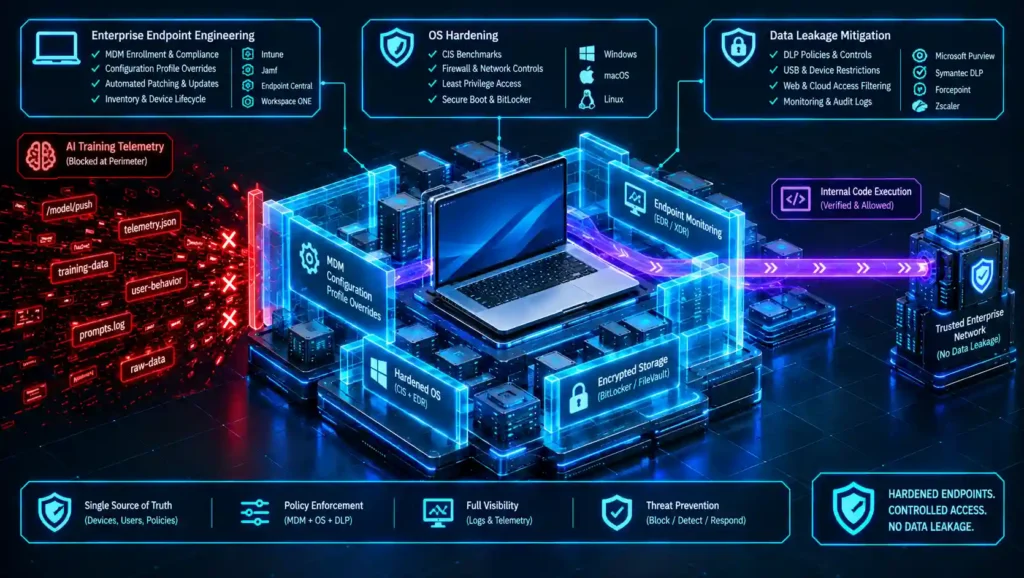
Relying on individual local users to manually configure core privacy settings fails to scale across distributed workplace environments, and these local settings do not survive an operating system reinstallation or a fresh hardware enrollment loop. The only durable technical control resides within your Mobile Device Management (MDM) infrastructure: declarative configuration profiles pushed from a centralized command dashboard, enforced fleet-wide, and completely immune to individual end-user modification or manual settings adjustment.
- Deploy declarative restriction keys across your managed fleet: The underlying operating system exposes a structured matrix of administrative restriction payload keys within its native configuration schema. Technical deployment teams must configure these keys declaratively to target integrated generative features—specifically disabling system writing assistants, custom image generation utilities, web browser summarisation engines, audio transcription modules, and external foundation model API routing pipelines. Pushing these rigid profile payloads straight to supervised, Automated Device Enrollment (ADE) workstations completely locks down the client-side system configuration matrix, ensuring that local operators cannot re-enable the background collection pathways.
- Verify restriction key coverage against your specific operating system build: System architects must account for a critical operational parameter: not every background generative computing layer maps out a corresponding administrative restriction key out of the box. While structural configuration coverage dynamically expands across subsequent patch releases, deployment managers must actively audit their active profile templates against the live restriction database explicitly matched to their precise macOS Sequoia build version. Pushing restriction strings without verifying comprehensive coverage creates a severe, dangerous false sense of security across your operational divisions, leaving secondary processing channels running completely unmonitored.
STEP 3: RUNTIME ENVIRONMENT CONTAINERIZATION AND LOCAL GATEWAY AUDITS
Configuration profiles establish high-level security policies, but corporate policy operating without active technical verification functions purely as a passive compliance document rather than a true operational control. The final step of your data protection lifecycle demands direct, on-device confirmation to verify that your pushed restrictions are actively enforced across local processing memory allocations and persistent disk cache locations—environments that could otherwise continue to retain sensitive plaintext process buffers long after a generative feature is nominally disabled.
- Audit local processing memory blocks and volatile cache directories: Enterprise security divisions must continuously monitor workstation storage sectors to confirm whether system caches are logging residual text fragments that passed through localized inference utilities prior to profile deployment. This verification loop must operate as a perpetual administrative engineering discipline rather than a single onboarding pass, executing on the identical recurring cadence applied to your most critical endpoint compliance checks to catch data persistence drift immediately.
- Align your verification schemas with the official device management references: Systems administrators constructing these automated endpoint validation scripts must work directly from the vendor’s live data management documentation rather than relying on cached, outdated internal spreadsheets. Utilizing the authoritative Apple platform deployment documentation provides your technical managers with a verified blueprint of exactly which model restriction keys exist, their minimum supported operating system patch variations, and their precise hardware supervision mandates—ensuring your compliance teams can definitively confirm whether a targeted text isolation filter is actively enforceable across your hardware estate.
CONCLUSION & GOVERNANCE BOUNDARY SUMMARY
A resilient data privacy and corporate safety posture operates as an active, ongoing system engineering discipline rather than a static stack of boardroom compliance checkboxes signed off once an audit cycle and forgotten. New operating system releases regularly alter which features exist, which specific restriction payload keys cover them, and which default settings ship out-of-the-box. A profile that completely closed every data pathway last quarter may not still do so after the next software update, requiring continuous tracking to ensure compliance perimeters do not decay.
Assuming an enterprise workstation is automatically safe simply because it features advanced hardware security chips introduces a highly dangerous false sense of security across your operational divisions. While hardware-isolated crypto-engines excel at protecting encryption keys at rest and dropping unauthorized boot loaders, they remain completely blind when localized system features quietly scrape context parameters from active memory buffers. If a default operating system tool is allowed to index your live desktop environment, it harvests your proprietary source code, financial spreadsheets, and client assets straight from execution memory—packaging the data into telemetry rows without throwing a single infrastructure error flag or triggering an internal system alarm.
Anchoring the fleet-wide strategy on continuously verified MDM payloads, rather than a one-time manual settings pass, is what actually lets an organization claim it can disable apple intelligence training exposure across every single managed endpoint—not just the few individual machines an administrator happened to check by hand.
Balancing rapid desktop execution velocity and modern device feature deployment with rigid, continuous endpoint verification remains one of the most complex orchestration challenges facing modern DevOps and identity access teams. We invite you to join the technical discussion in the comments section below: What specific mobile device management (MDM) payload keys, declarative configuration engines, or automated log correlation tools do you deploy to monitor your workstation perimeters against unmapped background telemetry harvesting? Have you successfully shifted your fleet profiles to automated policy-as-code deployment tracks, or are you running basic manual auditing sweeps during major operating system updates? Drop your structural layouts, custom endpoint protection patterns, and hard-earned advice with the engineering community below!
Related: ENISA Threat Landscape 2025: Ultimate Summary to Shield Corporate Networks – A comprehensive summary of the ENISA Threat Landscape 2025, examining evolving cyber threats, supply-chain risks, ransomware, AI-driven attacks, vulnerabilities, and the controls organizations need for stronger resilience.
Automated Access Review: 4 Crucial Steps to Stop Compliance Drift – A practical framework for small teams to automate access reviews, detect privilege drift, maintain audit-ready evidence, and securely remove stale permissions.
EU AI Act Compliance: 4 Crucial Steps to Stop Compliance Drift – EU AI Act compliance isn’t a one-time checklist—build a continuous SaaS roadmap for risk classification, transparency, logging, and audit readiness.
Prompt Injection Defense: 4 Crucial Tactics to Shield Corporate Networks – How Semantic Kernel can help defend AI applications against prompt injection attacks using structured orchestration and layered safeguards.
Prevent API Key Leakage: 4 Crucial Steps to Shield Corporate Networks – A layered framework for keeping API keys out of local AI application code — externalized configs, vaulted secrets, pre-commit/pipeline scanning, and proxy-isolated credential handling.
Private Background Removal Tools: 5 Crucial Options to Stop Corporate Leaks – The blog explains how organizations can use private, locally processed background-removal tools and layered governance controls to prevent sensitive client assets from leaking through unvetted third-party services.
FREQUENTLY ASKED QUESTIONS (FAQ)
Q1. If an organization blocks Apple Intelligence globally via MDM, will it inadvertently disable legacy Siri features or standard offline dictation functions?
No, target configuration payload keys are strictly engineered to isolate generative foundation model features like writing tools and local canvas text summarization loops. Legacy voice commands, local spelling dictionaries, and standard client-side text dictation pipelines continue to execute natively on the hardware without relying on background generative runtime resources.
Q2. How can an IT team verify that a newly released macOS update has not silently unmapped our pushed restriction profile parameters?
System engineers should deploy continuous configuration reporting policies within their device management dashboard to scan target keys daily. If a seasonal dot-release or security patch updates the operating system’s baseline framework, your automated tracking software detects any structural schema modifications instantly, allowing you to patch or redeploy profile strings before unmapped data pipelines can pass traffic.
Q3. Does disabling Apple Intelligence at the enterprise level also block the local Neural Engine hardware from accelerating third-party design applications?
No, pushing an administrative restriction payload blocks only the first-party Apple model orchestration layers and diagnostic synchronization scripts. The physical Apple Neural Engine (ANE) processor remains completely unlocked at the silicon layer, granting third-party developer software full hardware acceleration rights for isolated, localized computing tasks.
Q4. If an employee connects a personal Apple ID to their corporate managed Mac, can they override pushed MDM profile limitations locally?
No, system-level restriction keys pushed via a corporate MDM server maintain structural dominance over user-tier account profiles. Even if a local user authenticates with an external Apple Account that has generative features active on personal devices, the operating system kernel honors the centralized profile bounds, greying out the options across local interfaces.
Q5. What is the primary limitation of relying on third-party endpoint firewalls to block data leakage from background model processing?
Endpoint firewalls intercept and drop unverified connection requests at the network transport boundaries based on target domain or port signatures. Because native system features leverage trusted, encrypted channels alongside routine system updates, network-layer firewalls cannot inspect the encrypted packets to distinguish harmless diagnostic syncs from actual code snippet leaks.
DISCLAIMER
Educational Notice: This article is published on AI Security Watch strictly for technical educational and general cybersecurity awareness purposes. The configurations and research discussed are based on public threat intelligence data. This content does not constitute professional IT architecture, legal, or financial advice. Because network configurations vary, always verify settings in an isolated test environment or consult with a qualified engineer before modifying live hardware or registries. AI Security Watch contains informational links to external resources; we are not responsible for third-party site accuracy or platform content.